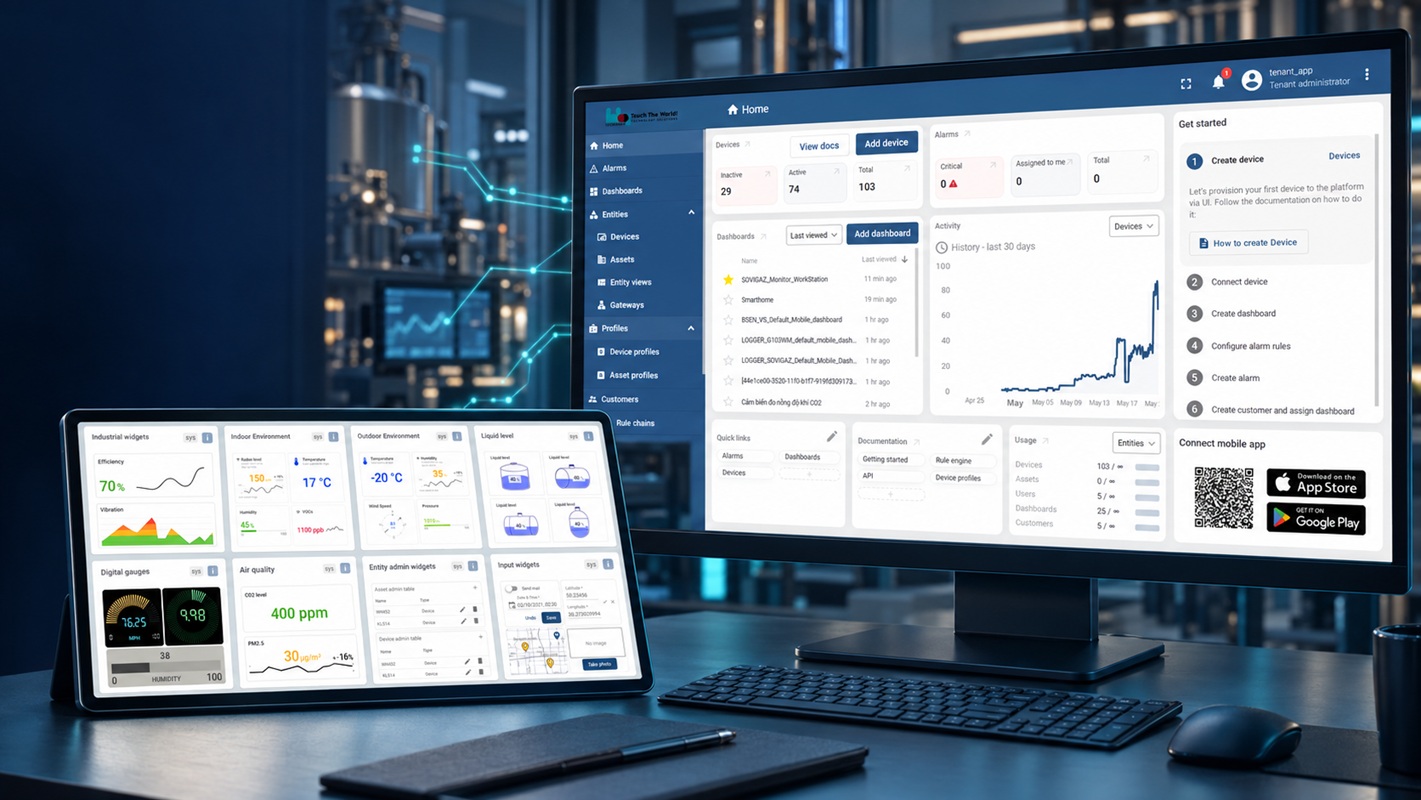
Nền tảng quản lý dữ liệu, thiết bị, dashboard và cảnh báo cho hệ thống
Industrial IoT và Smart Home.A platform for managing data, devices,
dashboards and alerts across Industrial IoT and Smart Home systems.
Nền tảng quản lý qua web · Tích hợp MQTT / HTTP REST APIWeb management platform · MQTT / HTTP REST API integration
Truy cậpAccessiot.hbqsolution.com
Tích hợpIntegrationMQTT · HTTP REST API
Phiên bản tài liệuDocument
releaseRelease candidate · 09/09/2026
01 / Năng lực nền tảng01 / Platform
capabilities
Từ kết nối thiết bị đến giao diện vận hànhFrom device
connectivity to operational views
HBQconnect tổ chức dữ liệu thiết bị thành profile, dashboard và
rule cảnh báo. Các tính năng hiển thị phụ thuộc quyền tài khoản và cấu hình dự án.HBQconnect organizes device data into profiles, dashboards and alert rules. Visible
functions depend on account permissions and project configuration.
Quản lý thiết bịDevice management
Tên, loại, trạng thái, thời gian kết nối và dữ liệu mới nhất.Name, type, status, connection time and latest data.
Devices
Dashboard & widget
Biểu đồ, đồng hồ, bảng, card và nội dung hiển thị tùy chỉnh.Charts, gauges, tables, cards and configurable presentation.
Visualization
Device profile
Chuẩn hóa loại thiết bị, dashboard mobile và rule cảnh báo.Standardize device type, mobile dashboard and alert rules.
Configuration
Cảnh báoAlerts
Rule cảnh báo được cập nhật theo profile và dữ liệu đầu vào.Alert rules are configured by profile and evaluated against input data.
Rule
Tích hợp dữ liệuData integration
MQTT hoặc HTTP REST API theo profile và định dạng thống nhất.MQTT or HTTP REST API using an agreed profile and data contract.
API
Web & MobileWeb & Mobile
Theo dõi từ giao diện web và ứng dụng HBQconnect trên điện thoại.Monitor from the web interface and HBQconnect mobile application.
Access
Phạm vi công bố:Published
scope:tài liệu nguồn chưa xác nhận SLA, HA, sao lưu, số thiết bị
tối đa, thời gian lưu dữ liệu, cấu hình CPU/RAM, vị trí lưu trữ hay gói giấy phép. Các mục này cần được xác
nhận theo phương án thương mại trước khi công bố.source documents do not
confirm SLA, HA, backup, maximum device count, retention period, CPU/RAM sizing, data location or licensing
packages. Confirm these commercial terms before publication.
02 / Kiến trúc hệ thống02 / System
architecture
Chuỗi dữ liệu từ hiện trường đến người dùngData chain
from field assets to users
Kiến trúc chức năngFunctional
architecture
Cảm biến / Thiết bịSensors /
DevicesDữ liệu hiện trườngField data
→
Gateway / ServerThu thập & chuyển tiếpCollect & forward
→
HBQconnectDevice · Profile · Data · Rule
→
Web / MobileDashboard & cảnh báoDashboards & alerts
Sơ đồ thể hiện luồng chức năng. Giao thức thiết bị hiện trường và
cách triển khai hạ tầng phụ thuộc từng dự án.This diagram shows functional
flow. Field protocols and infrastructure deployment depend on the project.
LớpLayer
Trách nhiệmResponsibility
Điểm kiểm traVerification point
Hiện trườngField
Đo, tạo trạng thái hoặc nhận lệnh.Measure,
produce state or receive commands.
Nguồn, kết nối, dữ liệu gốc.Power, connectivity,
raw data.
Kết nốiConnectivity
Chuyển dữ liệu bằng giao thức đã thống nhất.Transport data through the agreed protocol.
Thông tin kết nối, xác thực, bản tin.Connection
settings, authentication, messages.
HBQconnect
Quản lý thiết bị, telemetry, profile, dashboard và rule.Manage devices, telemetry, profiles, dashboards and rules.
Latest telemetry, Key/Value, profile được gán.Latest telemetry, key/value and assigned profile.
Ứng dụngApplication
Trình bày thông tin cho người vận hành.Present
information to operators.
Đúng dashboard, đơn vị, thời gian và quyền.Correct dashboard, units, time and permissions.
03 / Truy cập & quyền03 / Access &
roles
Đăng nhập bằng tài khoản được cấp quyềnSign in with an
authorized account
Đăng nhậpSign inNhập email và mật khẩu của tài khoản đã được cấp.Enter the
email and password for the assigned account.
Kiểm tra phạm vi quyềnVerify permission
scopeXác nhận các menu Dashboard, Devices và Device profiles phù
hợp vai trò.Confirm that Dashboard, Devices and Device profiles menus match
the assigned role.
Kết thúc phiênEnd the
sessionChọn Logout sau khi thao tác, đặc biệt trên máy dùng
chung.Use Logout when finished, especially on a shared computer.
Giao diện nguồn từ HBQconnect Manual. Tên và số liệu là dữ liệu minh
họa.Source interface from the HBQconnect Manual. Names and values are
illustrative.
Quyền chỉnh sửa:Edit
permissions:tài liệu nguồn dùng cả thuật ngữ tenant và admin. Wiki
sử dụng cách gọi “tài khoản có quyền quản trị phù hợp” cho đến khi ma trận vai trò được xác
nhận.source documentation uses both tenant and admin terminology. This wiki
uses “account with appropriate administrative permissions” until a role matrix is confirmed.
04 / Thiết bị & dữ liệu04 / Devices &
data
Kiểm tra telemetry trước khi thiết kế dashboardVerify
telemetry before designing dashboards
Mở DevicesOpen DevicesXác nhận tên, loại, trạng thái và thời gian kết nối.Verify
name, type, status and connection time.
Chọn thiết bịSelect a
deviceMở bảng thông tin bên phải và chọn Latest
telemetry.Open the detail panel and select Latest telemetry.
Đối chiếu Key/ValueValidate key/value
pairsGhi nhận đúng Key, giá trị, đơn vị và thời điểm cập nhật dùng
cho widget.Record the correct key, value, unit and update time for widget
configuration.
TrườngField
Ý nghĩa vận hànhOperational meaning
Timestamp
Thời điểm bản tin mới nhất; dữ liệu cũ không xác nhận thiết bị đang hoạt
động.Time of the latest message; stale data does not confirm a
currently active device.
Key
Định danh thông số. Widget phải dùng đúng Key.Parameter identifier. Widgets must reference the correct key.
Value
Giá trị đầu vào để hiển thị và đánh giá rule.Input value used for visualization and rule evaluation.
05 / Profile & cảnh báo05 / Profiles &
alerts
Chuẩn hóa thiết bị bằng device profileStandardize devices
with device profiles
Quan hệ cấu hìnhConfiguration
relationship
Device profileLoại thiết bịDevice type
→
Nhiều thiết bịMultiple
devicesCùng cấu trúcShared
structure
→
Mobile dashboardHiển thị chungShared view
+
Alert rulesTheo cấu hìnhConfigured rules
Tạo profileCreate a profile
Device profiles → +Chọn Create new device profile.Select Create new device profile.
Đặt tên và mô tảName and
describeDùng quy ước tên thống nhất theo model hoặc ứng
dụng.Use a consistent naming convention by model or application.
Gán dashboard mobileAssign the mobile
dashboardChọn dashboard đã kiểm tra hoặc cập nhật sau nếu chưa sẵn
sàng.Select a verified dashboard or assign it later if it is not
ready.
Lưu và gán thiết bịSave and assign
devicesTrong Devices, chỉnh sửa thiết bị, chọn profile rồi lưu
bằng dấu tích.In Devices, edit the device, select the profile and save with
the checkmark.
Kiểm soát thay đổi:Change
control:profile có thể được dùng chung bởi nhiều thiết bị. Trước
khi sửa dashboard hoặc rule, kiểm tra phạm vi ảnh hưởng và thử trên thiết bị đại diện.a profile may be shared by multiple devices. Before changing dashboards or rules, review the
impact and test with a representative device.
06 / Dashboard & widget06 / Dashboards &
widgets
Thiết kế giao diện giám sát theo dữ liệu thựcBuild
operational views from verified data
Tạo dashboardCreate a
dashboardDashboard → + → Create new dashboard; nhập tên, mô tả và
phạm vi người xem.Dashboard → + → Create new dashboard; enter name,
description and viewer scope.
Edit mode → Add widgetChọn biểu đồ, đồng hồ, bảng, list, card hoặc
widget tùy chỉnh phù hợp.Select a suitable chart, gauge, table, list, card or
custom widget.
Chọn nguồn dữ liệuSelect the data
sourceChọn đúng thiết bị và Key đã xác nhận trong Latest
telemetry.Select the correct device and key verified in Latest
telemetry.
Cấu hình thời gianConfigure time
scopeDùng dashboard time window để đồng bộ; dùng widget time
window khi cần phạm vi riêng.Use the dashboard time window for shared scope;
use a widget time window for an independent range.
Thiết lập hiển thịConfigure
presentationĐặt tiêu đề, đơn vị, trục X/Y và kích thước; sau đó
Add và Save.Set title, unit, X/Y axes and size; then Add and Save.
Thư viện widget minh họa các lựa chọn công nghiệp, môi trường, đồng hồ số,
chất lượng không khí và mức chất lỏng.The widget library includes industrial,
environmental, digital gauge, air quality and liquid-level views.
Đưa lên Mobile App:Publish to
Mobile App:gán dashboard cho device profile, xác nhận profile của
thiết bị và kiểm tra lại trên điện thoại.assign the dashboard to the device
profile, verify the device profile and validate it on the phone.
07 / Tích hợp dữ liệu07 / Data
integration
MQTT hoặc HTTP REST API theo hợp đồng dữ liệuMQTT or HTTP
REST API with an agreed data contract
Luồng tích hợp khuyến nghịRecommended integration flow
Thiết bị / Server bên thứ baThird-party device / server
→
MQTT / REST API
→
Device profileKey · Value · Unit
→
Telemetry / DashboardTelemetry
/ Dashboard
Hạng mục thống nhấtAgreement item
Nội dung tối thiểuMinimum content
Device identity
Cách định danh, tên, loại và profile của thiết bị.Device identifier, name, type and assigned profile.
Data contract
Key, kiểu dữ liệu, đơn vị, phạm vi hợp lệ và tần suất gửi dự kiến.Key, data type, unit, valid range and expected reporting interval.
Connectivity
Phương thức MQTT/REST, endpoint/broker, xác thực và định dạng bản tin do HBQ
cung cấp theo dự án.Project-specific MQTT/REST method, endpoint/broker,
authentication and message format supplied by HBQ.
Acceptance
Bản tin thử xuất hiện đúng trong Latest telemetry và dashboard hiển thị đúng
Key/Value.A test message appears correctly in Latest telemetry and the
dashboard displays the expected key/value.
08 / Vận hành & sự cố08 / Operations &
troubleshooting
Kiểm tra theo chuỗi nguyên nhânTroubleshoot along the
data chain
Hiện tượngSymptom
Kiểm tra đề xuấtRecommended checks
Không thấy chức năng chỉnh sửaEdit functions are
unavailable
Xác nhận đúng tài khoản và quyền quản trị.Verify
the account and administrative permission scope.
Telemetry không cập nhậtTelemetry is not
updating
Kiểm tra nguồn, mạng, cấu hình gửi, thông tin kết nối và thời gian bản tin
cuối.Check power, network, publishing configuration, connection
settings and latest message time.
Widget trốngWidget is empty
Kiểm tra thiết bị, Key, time window, việc Add/Save và dữ liệu trong Latest
telemetry.Verify device, key, time window, Add/Save state and Latest
telemetry data.
Giá trị hoặc đơn vị saiIncorrect value or
unit
Đối chiếu hợp đồng dữ liệu, Value gốc, Key, đơn vị và cấu hình
trục.Review the data contract, source value, key, unit and axis
configuration.
Mobile dashboard chưa đổiMobile dashboard did not
change
Kiểm tra dashboard gán cho profile, profile của thiết bị và mở lại màn hình
trên app.Verify the dashboard assigned to the profile, the device
profile and reopen the app view.
Cảnh báo không đúngAlert behavior is
incorrect
Kiểm tra rule của đúng profile, dữ liệu đầu vào, điều kiện và cấu hình thông
báo.Verify the rule on the correct profile, input data, conditions and
notification configuration.
09 / Nghiệm thu09 / Acceptance
Checklist phát hành cấu hìnhConfiguration release
checklist
Quyền tài khoản đúng với vai trò vận hành.Account
permissions match the operating role.
Tên thiết bị và profile tuân theo quy ước dự án.Device
and profile names follow the project convention.
Latest telemetry có đúng Key, Value và thời gian.Latest
telemetry contains the correct key, value and time.
Widget dùng đúng thiết bị, đơn vị và time window.Widgets use the correct device, unit and time window.
Dashboard web và mobile đã kiểm tra trên thiết bị đại diện.Web and mobile dashboards were tested on a representative device.
Rule cảnh báo đã thử với dữ liệu kiểm soát.Alert rules
were tested with controlled data.
Tích hợp đã qua bản tin thử và đối chiếu dashboard.Integration passed a test message and dashboard verification.
Phạm vi ảnh hưởng của thay đổi profile đã được rà soát.The impact scope of profile changes has been reviewed.
Khi yêu cầu hỗ trợ:When requesting
support:cung cấp tên thiết bị, profile, Key liên quan, thời điểm
lỗi, ảnh giao diện và bước tái hiện. Không gửi mật khẩu hoặc thông tin xác thực.provide device name, profile, related key, incident time, screenshots and reproduction
steps. Never send passwords or credentials.
Nguồn: HBQconnect Manual, trang 2–27; datasheet Rev. 1.1. Ảnh hero là minh
họa trình bày từ ảnh giao diện thật; ảnh màn hình trong các phần nội dung là ảnh nguồn chính
thức.Sources: HBQconnect Manual, pages 2–27; datasheet Rev. 1.1. The hero is a
presentation composite based on actual UI references; screenshots in the content sections are official
source images.