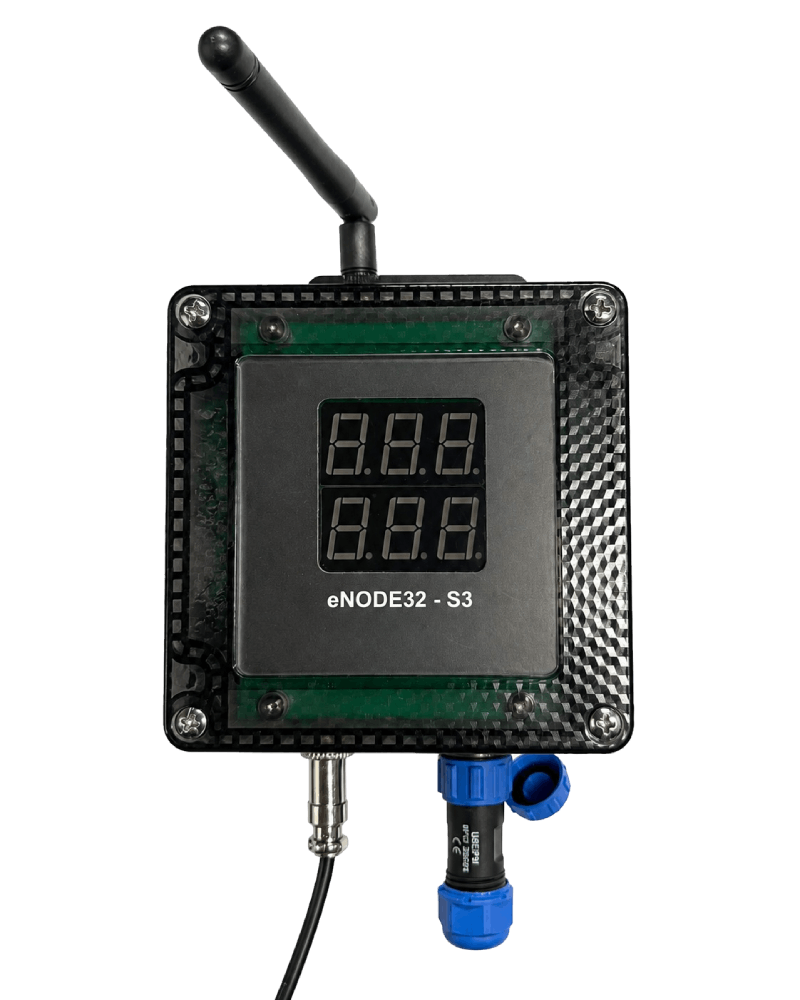
eNODE32 Industry IoT NodeNode IoT công nghiệp
Professional Industrial IoT Node featuring 10/100 Ethernet, RS485, Opto-isolated I/O, and High-power Relays. Engineered for reliable industrial automation and mission-critical edge data collection. Node IoT thu thập dữ liệu công nghiệp chuyên dụng, tích hợp Ethernet 10/100, RS485, I/O cách ly quang và Relay công suất lớn. Thiết kế cho tự động hóa và thu thập dữ liệu quan trọng tại hiện trường.
Full Hardware SpecsThông số phần cứng đầy đủ
Technical WikiWiki kỹ thuật
The eNODE32 is architected as a high-reliability Industry IoT Node. At its core is a high-performance 32-bit MCU, which manages high-level logic, dual-connectivity (WiFi/BLE), and secure web interfaces. Industrial-grade peripheral controllers ensure deterministic behavior: a dedicated hardware-offload Ethernet controller for stable networking, a protected transceiver for RS485, and galvanic isolation for all critical I/O paths. eNODE32 được thiết kế như một IoT Node cảm biến công nghiệp tin cậy cao. Trái tim của hệ thống là vi điều khiển 32-bit hiệu năng cao, quản lý logic cấp cao, kết nối không dây kép (WiFi/BLE) và giao diện web bảo mật. Các chip điều khiển ngoại vi chuẩn công nghiệp đảm bảo hành vi ổn định: bộ điều khiển Ethernet xử lý phần cứng cho kết nối mạng tin cậy, transceiver RS485 được bảo vệ và cách ly quang cho toàn bộ các đường I/O quan trọng.
The board features a robust power stage designed for industrial environments: Bo mạch sở hữu tầng công suất mạnh mẽ được thiết kế cho môi trường công nghiệp:
• Wide Input Range: Supports 7V to 36V via a high-efficiency synchronous Buck Converter.
• Smart Power MUX: Seamless automatic switching between USB-C power and External VIN, prioritizing industrial input.
• VSEN Adjustable Rail: Integrated boost converter (5-24V) to provide clean excitation power to external analog sensors, controllable via firmware.
• Supply Monitoring: Integrated voltage monitoring for real-time power-fail detection and graceful shutdown.
• Dải vào rộng: Hỗ trợ 7V đến 36V qua bộ chuyển đổi Buck đồng bộ hiệu suất cao.
• Chuyển mạch nguồn thông minh: Tự động chuyển đổi liền mạch giữa nguồn USB-C và VIN ngoài, ưu tiên nguồn công nghiệp.
• Rail VSEN điều chỉnh: Bộ boost tích hợp (5-24V) cung cấp nguồn kích thích sạch cho cảm biến analog ngoài, điều khiển qua firmware.
• Giám sát nguồn: Giám sát điện áp tích hợp để phát hiện mất nguồn thời gian thực và tắt máy an toàn.
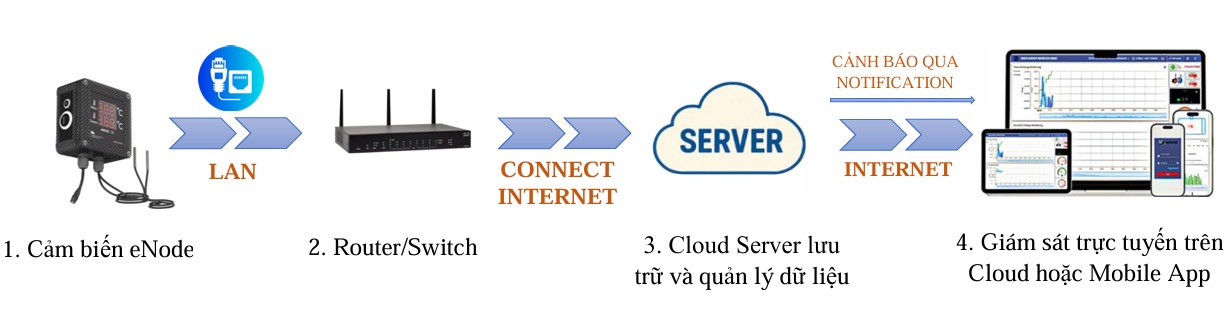
For mission-critical wired reliability, eNODE32 utilizes a high-speed SPI-to-Ethernet controller with a full hardware TCP/IP stack offload. This architecture ensures the main processor remains responsive even during high-bandwidth network activity or broadcast storms. Để đảm bảo độ tin cậy kết nối dây trong các ứng dụng quan trọng, eNODE32 sử dụng bộ điều khiển Ethernet qua giao tiếp SPI tốc độ cao với khả năng xử lý phần cứng toàn bộ stack TCP/IP. Kiến trúc này giúp vi điều khiển chính luôn đáp ứng nhanh ngay cả khi có lưu lượng mạng lớn hoặc các đợt broadcast mạnh.
• Protocol Offload: TCP, UDP, ICMP, IPv4, ARP, IGMP, PPPoE supported in external hardware.
• Isolation: Magnetic isolation via high-quality RJ45 transformer for EMI reduction and protection.
• Diagnostics: Link and Speed/Activity LEDs integrated on the RJ45 port.
• Xử lý giao thức phần cứng: Hỗ trợ TCP, UDP, ICMP, IPv4, ARP, IGMP, PPPoE bằng phần cứng ngoài.
• Cách ly: Cách ly từ tính qua biến áp RJ45 chất lượng cao để giảm nhiễu EMI và bảo vệ.
• Chẩn đoán: LED Link và Speed/Activity tích hợp trên cổng RJ45.
The RS485 interface is designed for harsh industrial environments, featuring high-speed data transmission with multi-stage surge protection (TBU and TVS rail clamping). It is ideal for Modbus RTU communication in factories. Giao tiếp RS485 được thiết kế cho môi trường công nghiệp khắc nghiệt, hỗ trợ truyền dữ liệu tốc độ cao với bảo vệ chống xung nhiều tầng (TBU và TVS rail clamping). Lý tưởng cho truyền thông Modbus RTU trong nhà máy.
• DI1..3: Opto-isolated inputs, active low at MCU side.
• DO1..3: Opto-isolated outputs, driving Relay coils or external logic.
• Relays: 3 channels SPDT 2A/250VAC.
• DI1..3: Đầu vào cách ly quang, active low ở phía MCU.
• DO1..3: Đầu ra cách ly quang, điều khiển cuộn Relay hoặc logic ngoài.
• Relay: 3 kênh SPDT 2A/250VAC.
The eNODE32 implements several industrial safety mechanisms to ensure continuous operation in critical environments. eNODE32 tích hợp nhiều cơ chế an toàn công nghiệp để đảm bảo vận hành liên tục trong các môi trường quan trọng.
• Galvanic Isolation: All digital inputs and outputs are opto-isolated to protect the core processing unit from high-voltage spikes and ground loops.
• Power Protection: Reverse polarity protection on VIN and isolated battery backup input to prevent data loss during power outages.
• Surge Immunity: RS485 and I/O lines feature industrial-grade surge and ESD protection compliant with high-reliability standards.
• Cách ly quang: Toàn bộ đầu vào và đầu ra số đều cách ly quang để bảo vệ lõi xử lý khỏi xung điện áp cao và vòng lặp mass.
• Bảo vệ nguồn: Chống đảo cực trên VIN và đầu vào pin dự phòng cách ly để tránh mất dữ liệu khi mất điện.
• Chống xung: Đường RS485 và I/O có bảo vệ xung và ESD cấp công nghiệp, đáp ứng tiêu chuẩn độ tin cậy cao.
• Independent Watchdog: Hardware watchdog ensures the system automatically reboots in case of firmware freeze.
• Brown-out Detection: Real-time monitoring of the power supply allows the system to enter a safe state and save critical data before the voltage drops below operational levels.
• Dual-Bank OTA: Supports secure firmware updates with automatic rollback capability if an update fail.
• Watchdog độc lập: Watchdog phần cứng đảm bảo hệ thống tự khởi động lại khi firmware bị treo.
• Phát hiện sụt áp: Giám sát nguồn thời gian thực giúp hệ thống vào trạng thái an toàn và lưu dữ liệu quan trọng trước khi điện áp xuống dưới mức vận hành.
• OTA hai bank: Hỗ trợ cập nhật firmware an toàn với khả năng tự rollback nếu cập nhật thất bại.
eNode32 Control Panel · Rev 1.0Bảng điều khiển eNode32 · Rev 1.0
- Power on the eNODE32 and connect your computer to the same LAN (Ethernet or default WiFi AP).Cấp nguồn cho eNODE32 và kết nối máy tính cùng mạng LAN (Ethernet hoặc WiFi AP mặc định).
- Open Chrome or Safari and navigate to the device IP address.Mở Chrome hoặc Safari, truy cập địa chỉ IP của thiết bị.
- The eNode32 Control Panel appears with a left sidebar menu for all configuration tabs.Giao diện eNode32 Control Panel hiển thị thanh menu bên trái với các mục cấu hình.
192.168.1.32. When operating in WiFi AP mode, use 192.168.4.1.
Địa chỉ IP: Thiết bị nhận IP qua DHCP. Nếu không có DHCP trong 30 giây, thiết bị dùng IP tĩnh 192.168.1.32. Khi ở chế độ WiFi AP, truy cập 192.168.4.1.
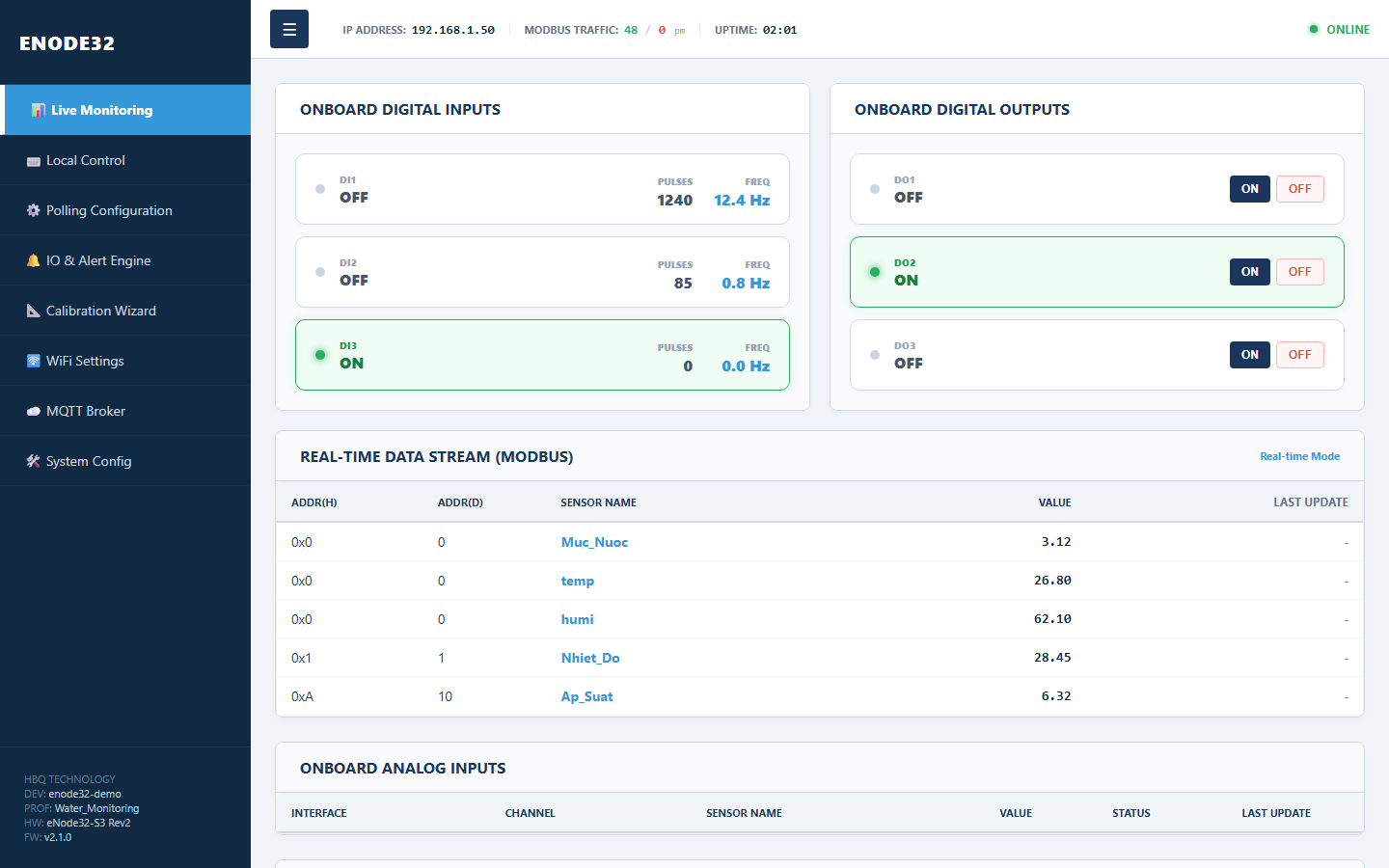
Tab 📊 Live Monitoring shows real-time device status:Tab 📊 Live Monitoring hiển thị trạng thái thiết bị theo thời gian thực:
• Digital Inputs (DI1–DI3): ON/OFF state, pulse count and frequency.
• Digital Outputs (DO1–DO3): Direct relay control from the web.
• Modbus / ADC / I2C: Sensor data table for configured channels.
• Digital Inputs (DI1–DI3): Trạng thái ON/OFF, số xung và tần số.
• Digital Outputs (DO1–DO3): Điều khiển relay trực tiếp từ web.
• Modbus / ADC / I2C: Bảng dữ liệu cảm biến đã cấu hình.
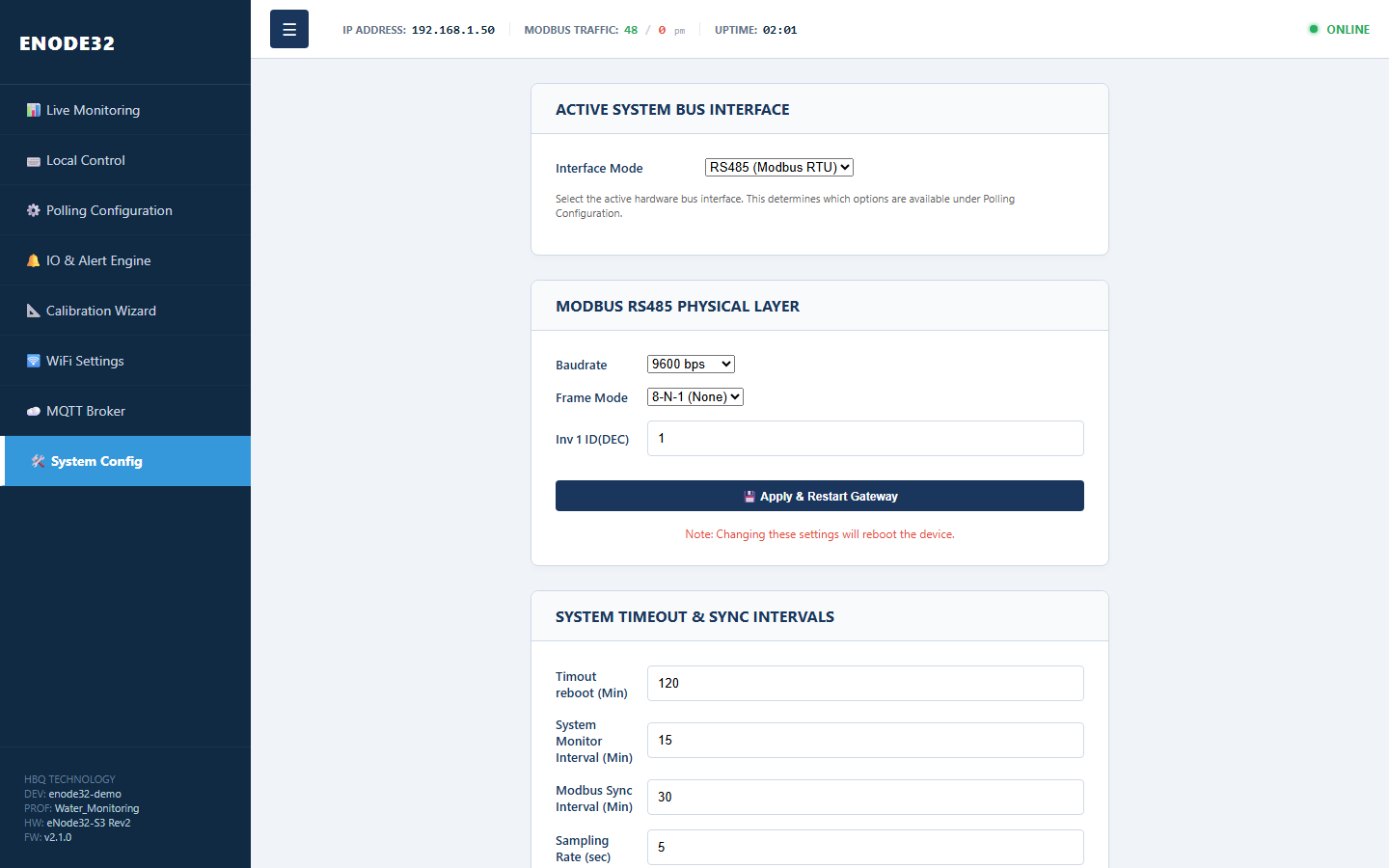
Open 🛠️ System Config to choose the bus interface before configuring sensors:Vào 🛠️ System Config để chọn giao diện bus trước khi cấu hình cảm biến:
| ModeChế độ | DescriptionMô tả |
|---|---|
| RS485 (Modbus RTU) | Read registers from slave devices via RS485 portĐọc thanh ghi từ thiết bị slave qua cổng RS485 |
| I2C Sensors | Use onboard SHT40, SCD40, SPS30 sensorsDùng cảm biến onboard SHT40, SCD40, SPS30 |
This tab also configures Modbus baudrate, MQTT publish interval, 7-segment LED display and system reset.Cùng tab này bạn cấu hình baudrate Modbus, chu kỳ gửi MQTT, màn hình LED 7-segment và reset hệ thống.
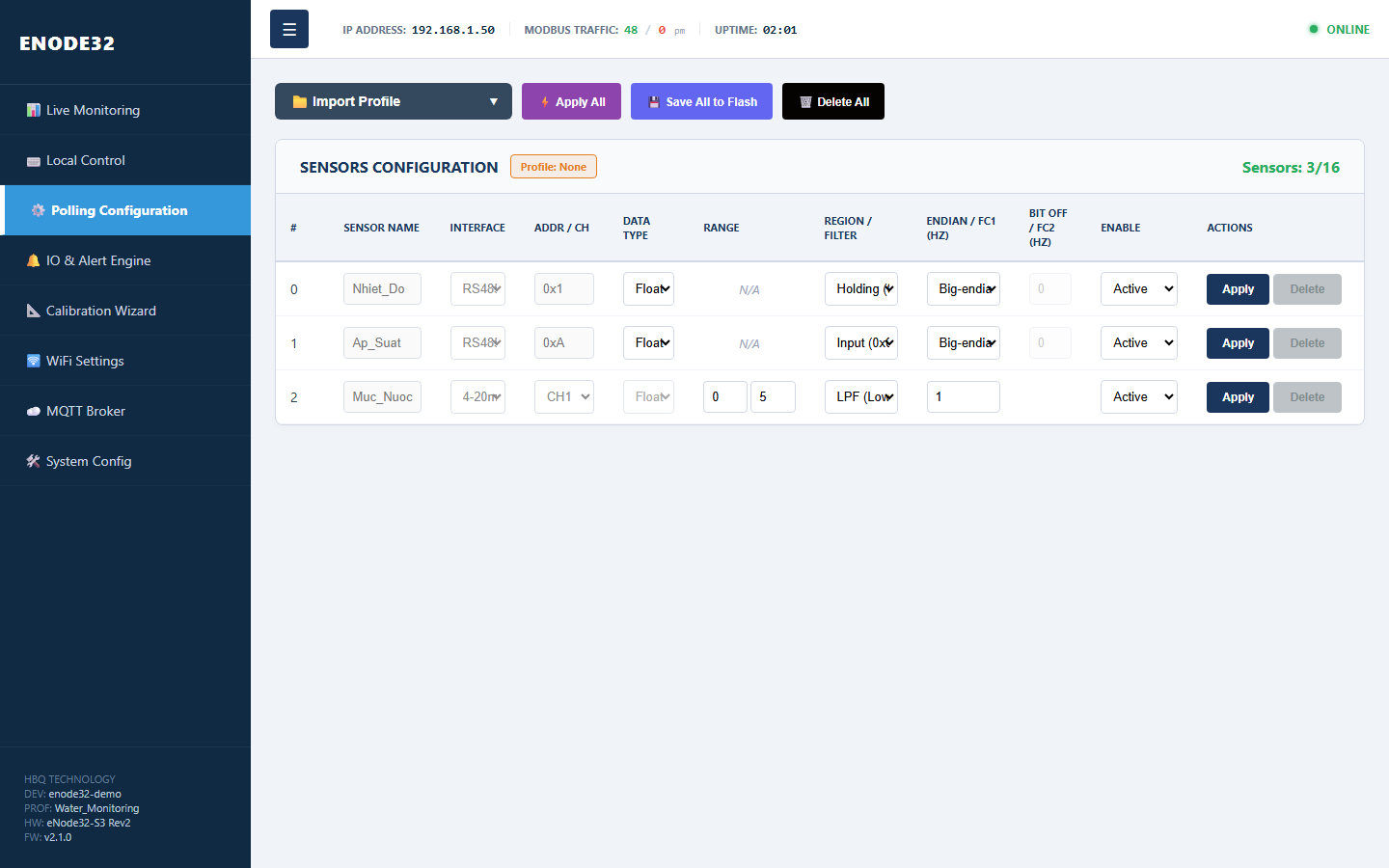
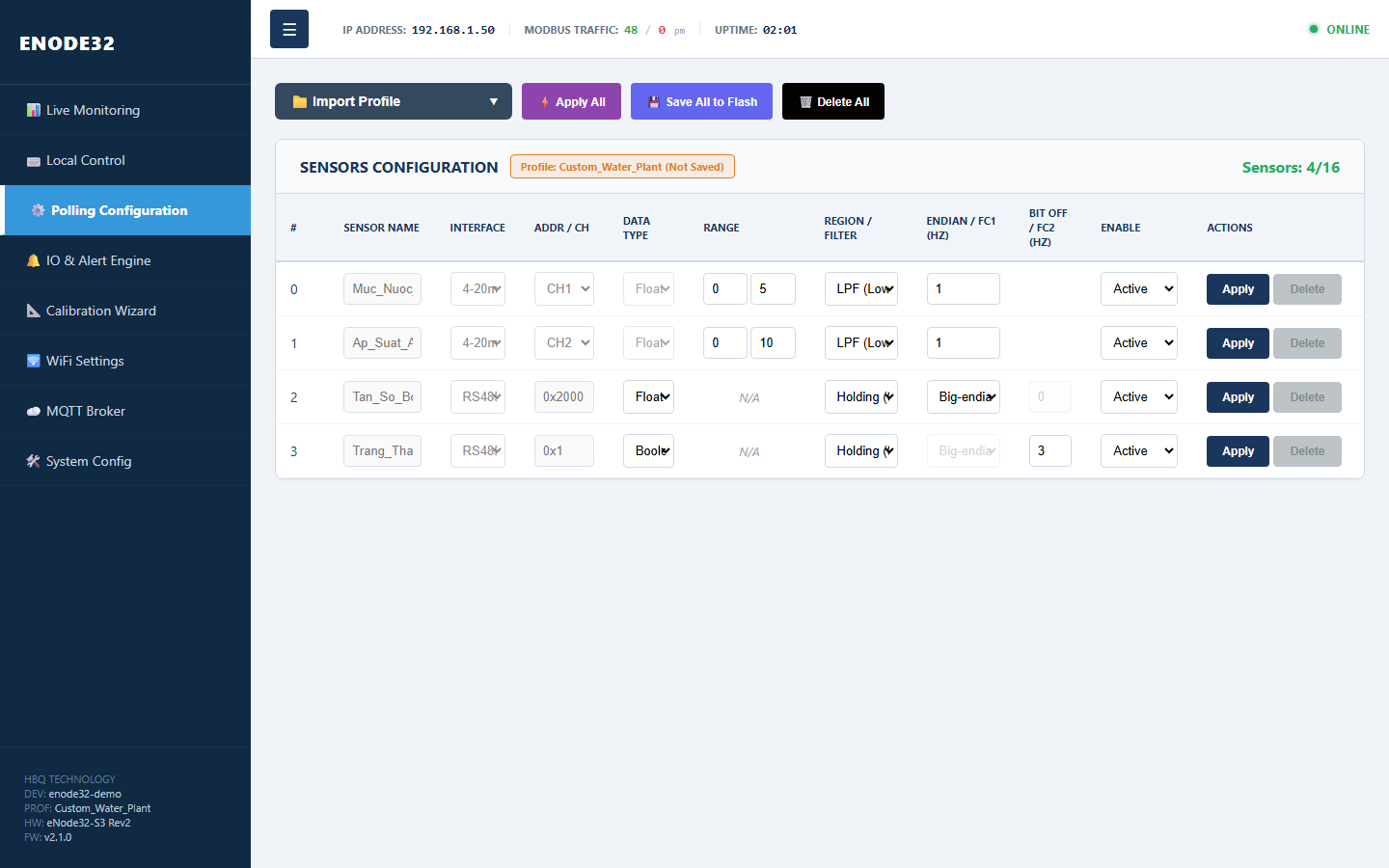
Tab ⚙️ Polling Configuration manages up to 16 sensors per bus. Each row defines: sensor name, interface (RS485 / 4-20mA / I2C), register address or ADC channel, data type, filter and Enable status.Tab ⚙️ Polling Configuration quản lý tối đa 16 cảm biến trên mỗi bus. Mỗi dòng cấu hình gồm: tên sensor, giao tiếp (RS485 / 4-20mA / I2C), địa chỉ thanh ghi hoặc kênh ADC, kiểu dữ liệu, bộ lọc và trạng thái Enable.
device_profile5. Import Profile — khai báo device_profileQuick-import sensor configuration via 📁 Import Profile. Each profile is tagged with a project/device name in the first CSV metadata line:Import nhanh cấu hình cảm biến qua menu 📁 Import Profile. Mỗi profile gắn tên dự án/thiết bị qua metadata ở dòng đầu file CSV:
Built-in profiles on web:Profile có sẵn trên web:
| MenuMenu | Default device_profiledevice_profile mặc định | Channels createdKênh tạo ra |
|---|---|---|
| SHT40 | SENSOR_TH | temp, humi |
| SCD40 | SENSOR_CO2 | CO2, Temp, Humi |
| SPS30 | Air_Quality | PM1.0, PM2.5, PM4.0, PM10 and particle countsPM1.0, PM2.5, PM4.0, PM10 và số hạt |
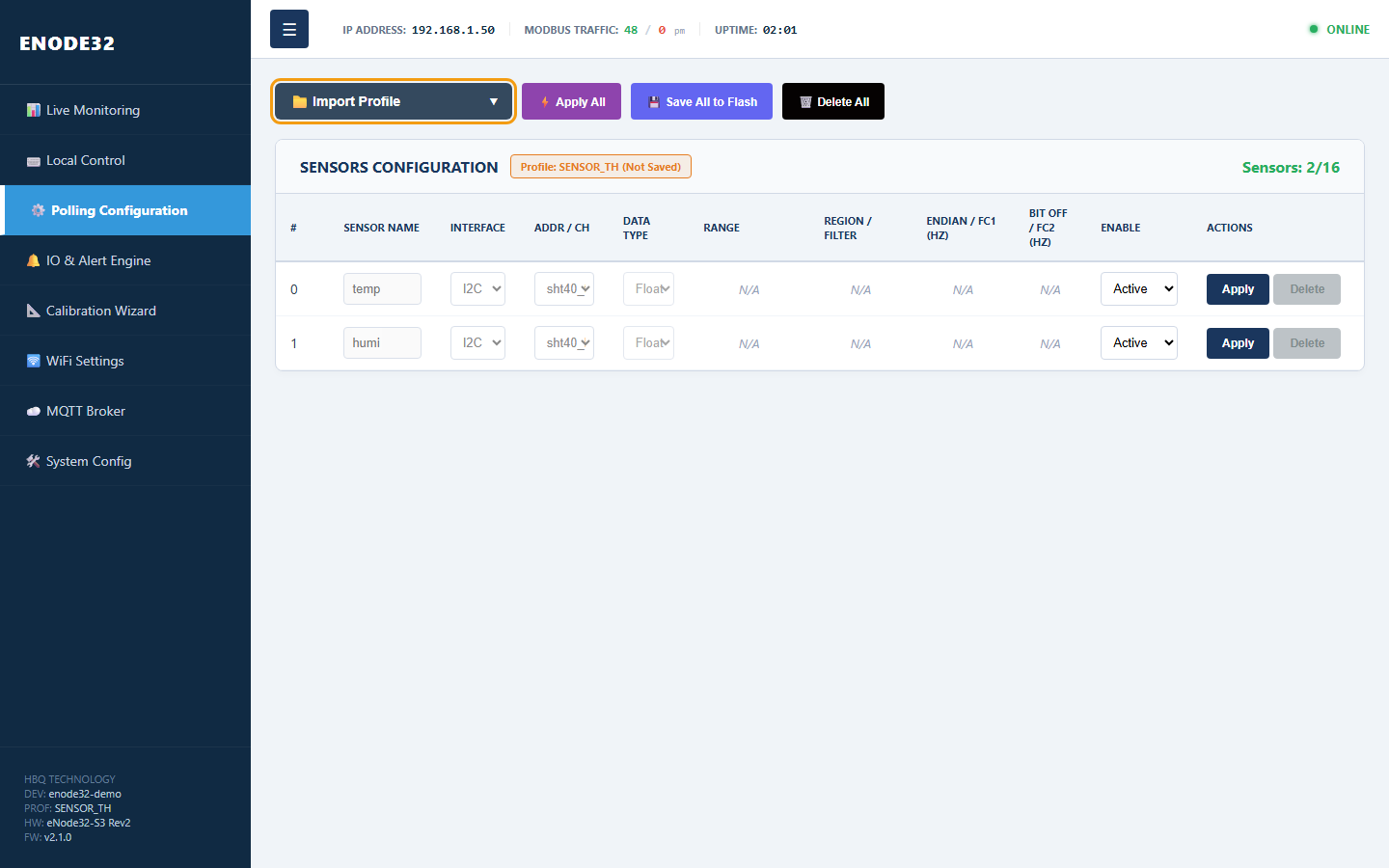
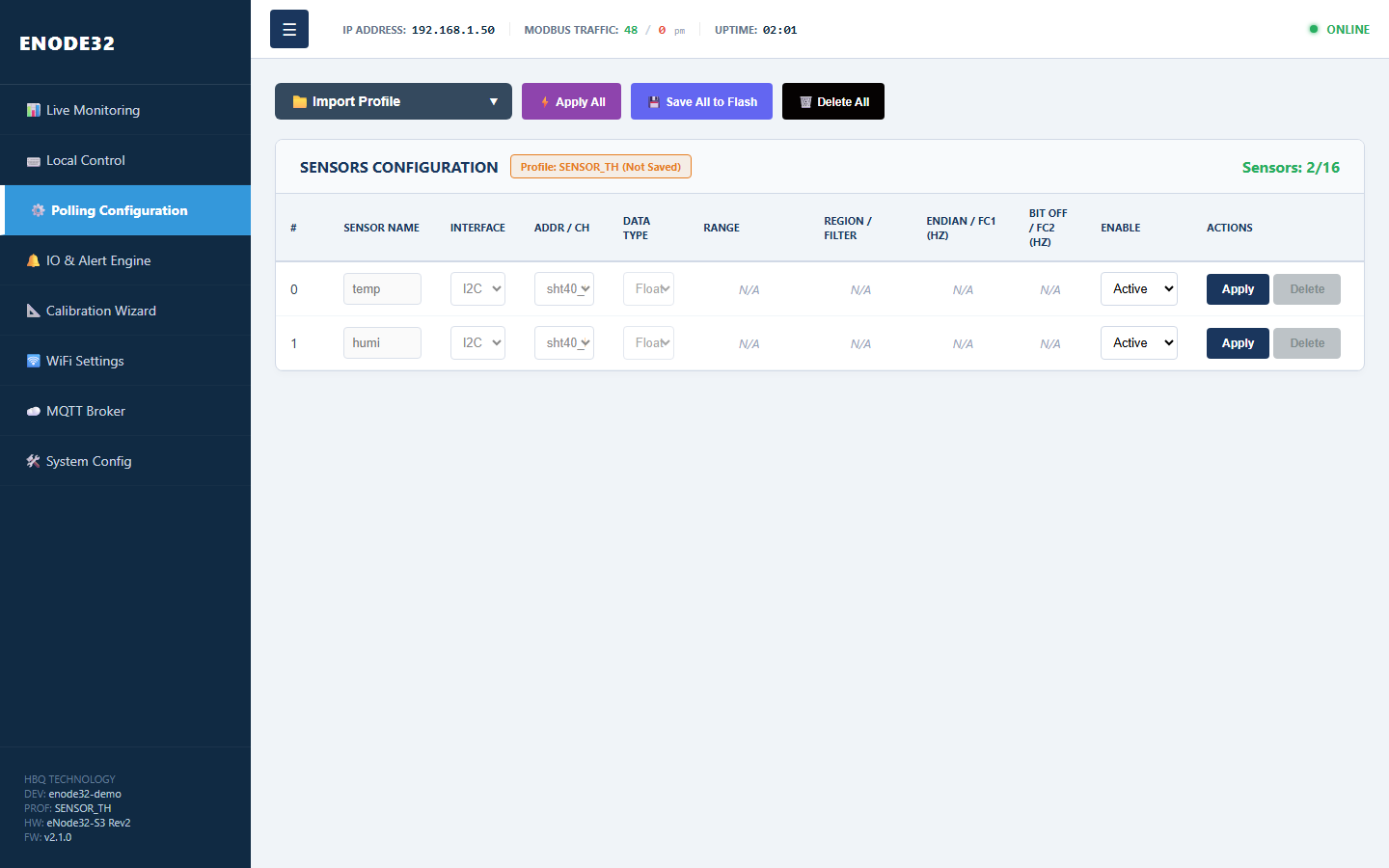
The profile name appears in the Profile: ... label and sidebar footer (PROF). This value is sent to cloud/MQTT for device classification by project.Tên profile hiển thị ở nhãn Profile: ... và footer sidebar (PROF). Giá trị này được gửi lên cloud/MQTT để phân loại thiết bị theo dự án.
Select 📂 Custom CSV File... to upload a user-defined channel list. This is the most flexible option when combining multiple interface types in one node.Chọn 📂 Custom CSV File... để upload file tự định nghĩa các kênh đo theo dự án. Đây là cách linh hoạt nhất khi cần kết hợp nhiều loại giao tiếp trong một node.
| ChannelTên kênh | InterfaceGiao tiếp | MeaningÝ nghĩa |
|---|---|---|
| Muc_Nuoc_ADC1 | 4-20mA CH1 | Water level 0–5 m, LPF 1 HzMức nước 0–5 m, bộ lọc LPF 1 Hz |
| Ap_Suat_ADC2 | 4-20mA CH2 | Pressure 0–10 barÁp suất 0–10 bar |
| Tan_So_Bom | RS485 Float | Pump frequency from register 0x2000Tần số bơm đọc từ thanh ghi 0x2000 |
| Trang_Thai_Relay | RS485 Boolean | Read bit 3 at register 0x0001Đọc bit 3 tại thanh ghi 0x0001 |
Sample template: eNode32_Sensor_Profile_Template_V2.1.csv. Column details: CSV Import Guide V2.1.File mẫu: eNode32_Sensor_Profile_Template_V2.1.csv. Chi tiết cột CSV: CSV Import Guide V2.1.
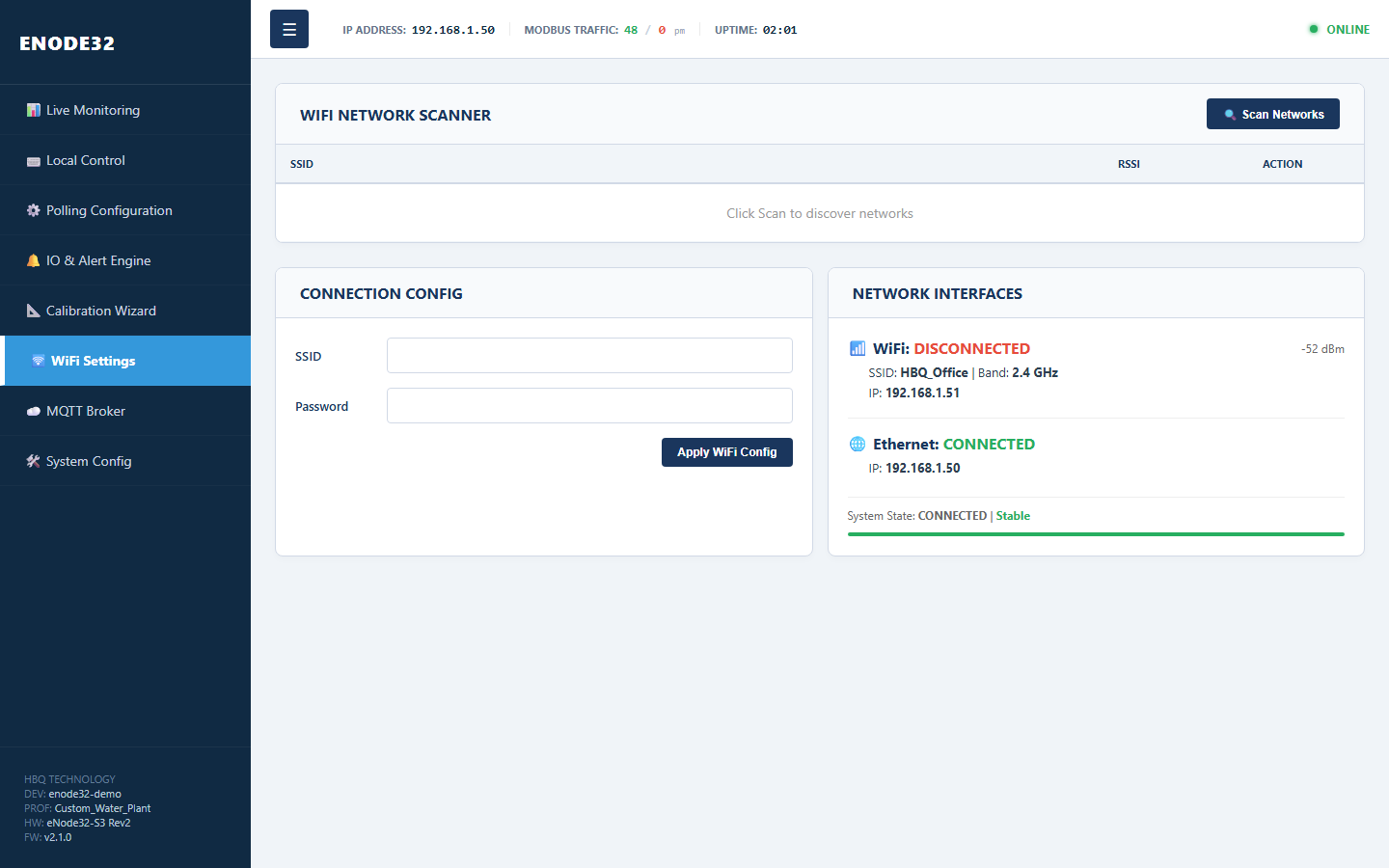
Tab 🛜 WiFi Settings: scan networks, enter SSID/password and view WiFi/Ethernet status.Tab 🛜 WiFi Settings: quét mạng, nhập SSID/password và xem trạng thái WiFi/Ethernet.
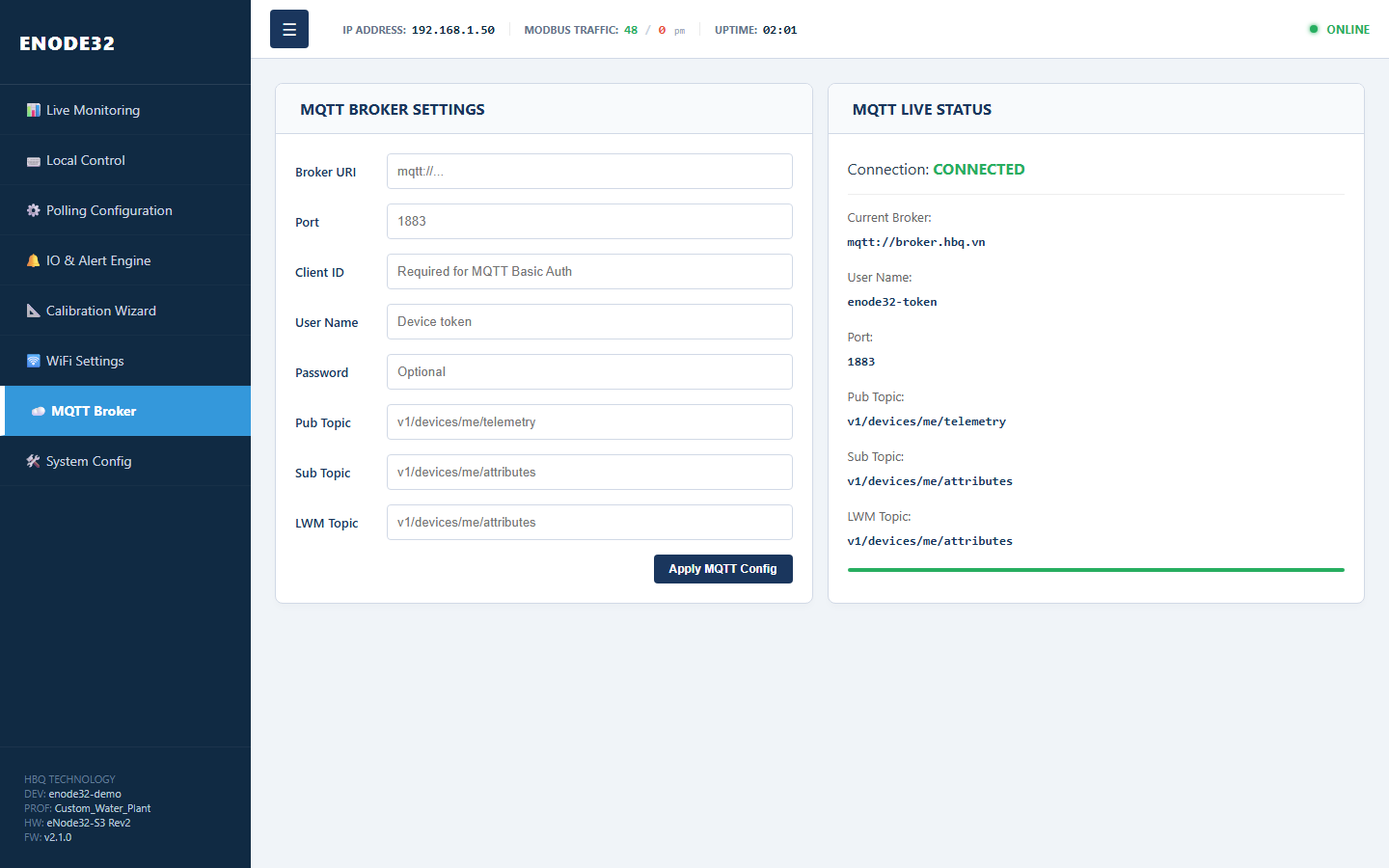
Configure broker URI, port, client ID, token and telemetry/attributes/LWT topics for IoT platforms (ThingsBoard, Mosquitto, etc.).Cấu hình broker URI, port, client ID, token và các topic telemetry/attributes/LWT cho nền tảng IoT (ThingsBoard, Mosquitto, ...).
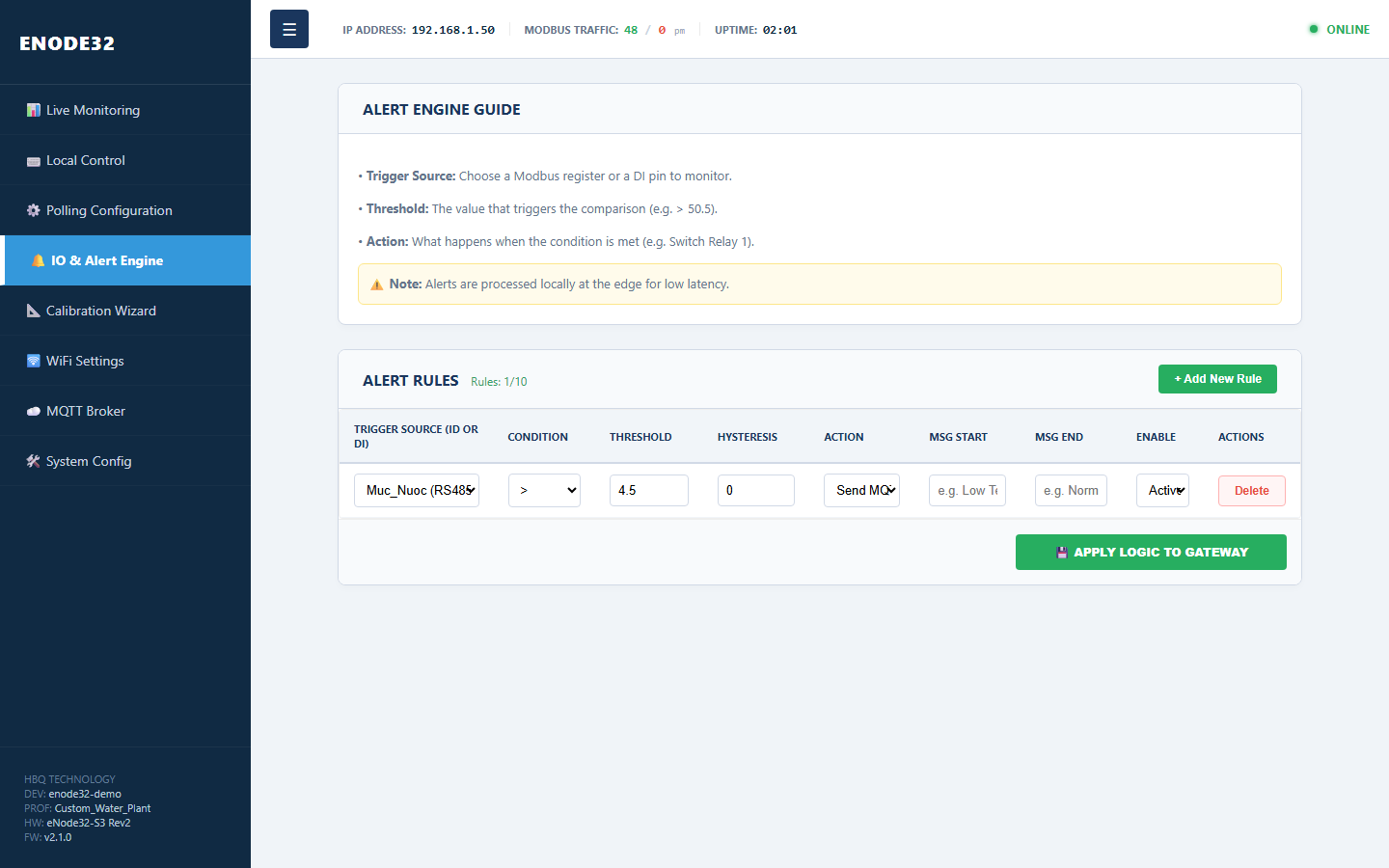
Create local alert rules: select trigger source (sensor or DI), threshold, hysteresis and action (enable DO/relay). Processed at the edge with low latency.Tạo rule cảnh báo cục bộ: chọn nguồn trigger (sensor hoặc DI), ngưỡng, hysteresis và hành động (bật DO/relay). Xử lý tại edge, độ trễ thấp.
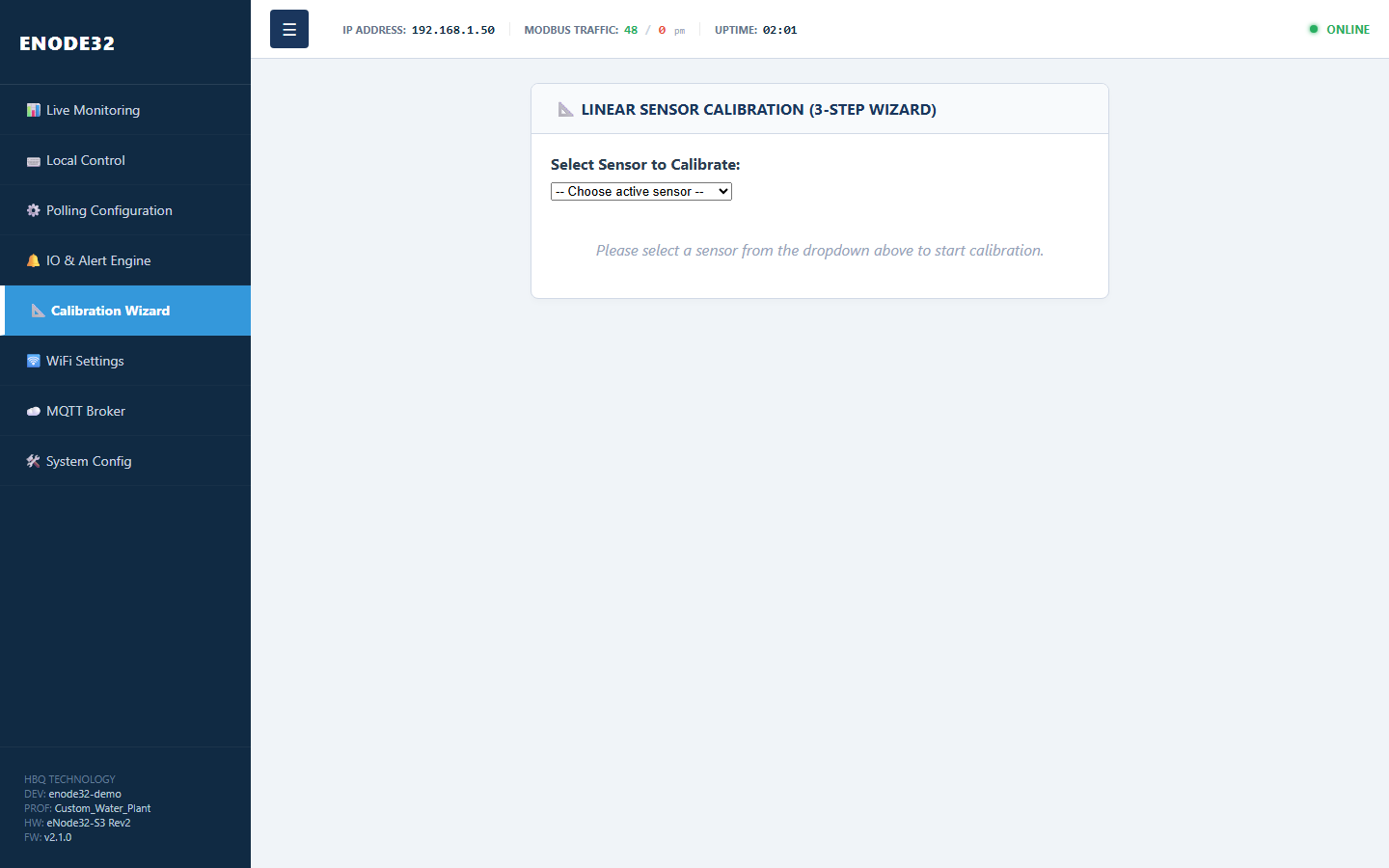
3-step linear calibration for 4-20mA analog sensors: zero point, span point and confirm save coefficients.Hiệu chuẩn tuyến tính 3 bước cho cảm biến analog 4-20mA: điểm zero, điểm span và xác nhận lưu hệ số.
- System Config → select RS485 or I2C, Apply if bus changed.System Config → chọn RS485 hoặc I2C, Apply nếu đổi bus.
- Polling Configuration → Import Profile / Custom CSV or edit rows manually.Polling Configuration → Import Profile / Custom CSV hoặc chỉnh từng dòng.
- Click ⚡ Apply All — write sensor config to RAM.Nhấn ⚡ Apply All — ghi cấu hình cảm biến vào RAM.
- Click 💾 Save All to Flash — persist permanently (including
device_profile).Nhấn 💾 Save All to Flash — lưu vĩnh viễn (kể cảdevice_profile). - WiFi / MQTT → Apply each section; device may reboot when Modbus bus changes.WiFi / MQTT → Apply từng mục; thiết bị có thể reboot khi đổi Modbus bus.
- Verify data on the Live Monitoring tab.Kiểm tra lại tab Live Monitoring để xác nhận dữ liệu.
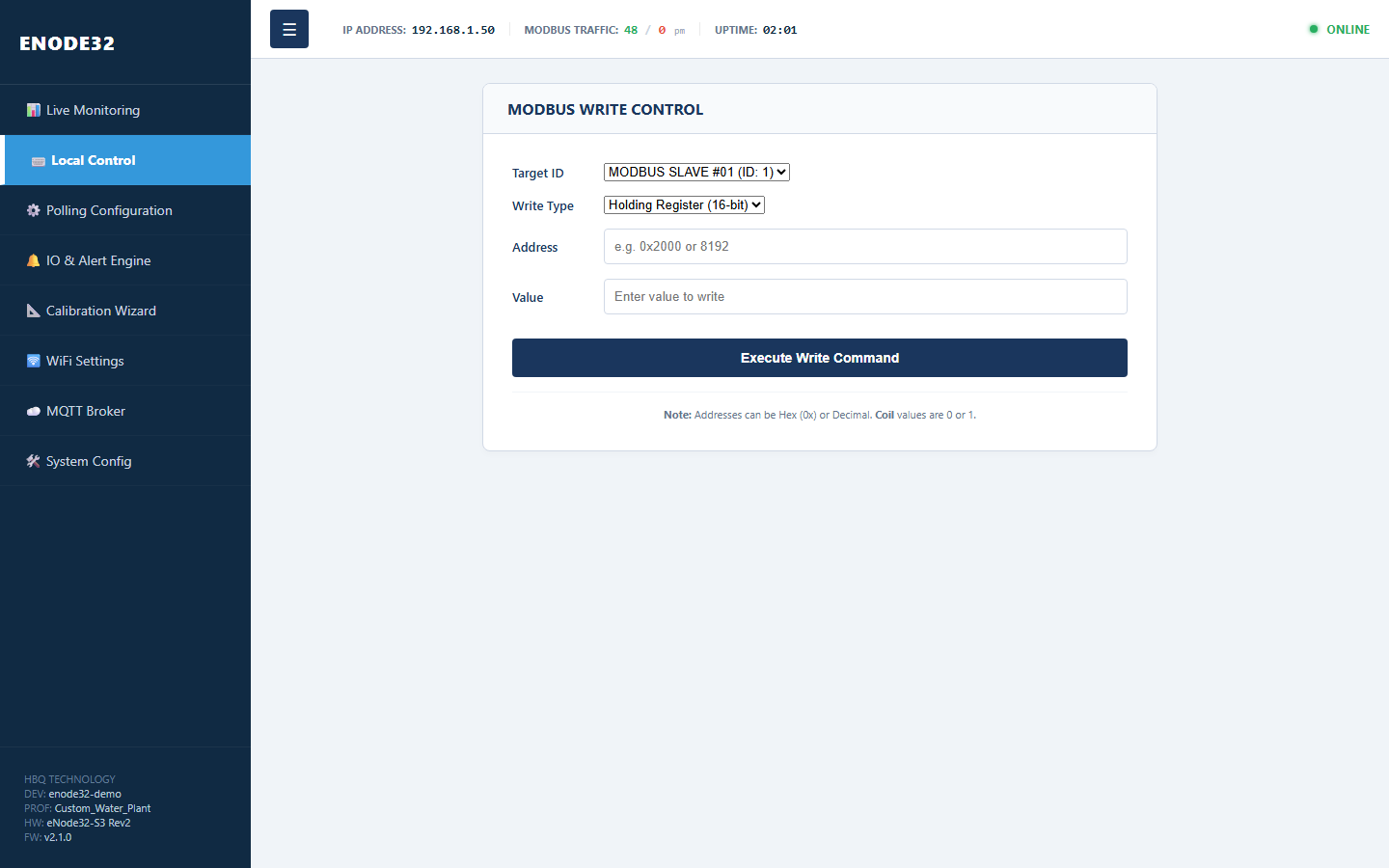
Tab ⌨️ Local Control writes Modbus registers (holding register or coil) for on-site debugging.Tab ⌨️ Local Control dùng để ghi thử thanh ghi Modbus (holding register hoặc coil) khi cần debug tại hiện trường.
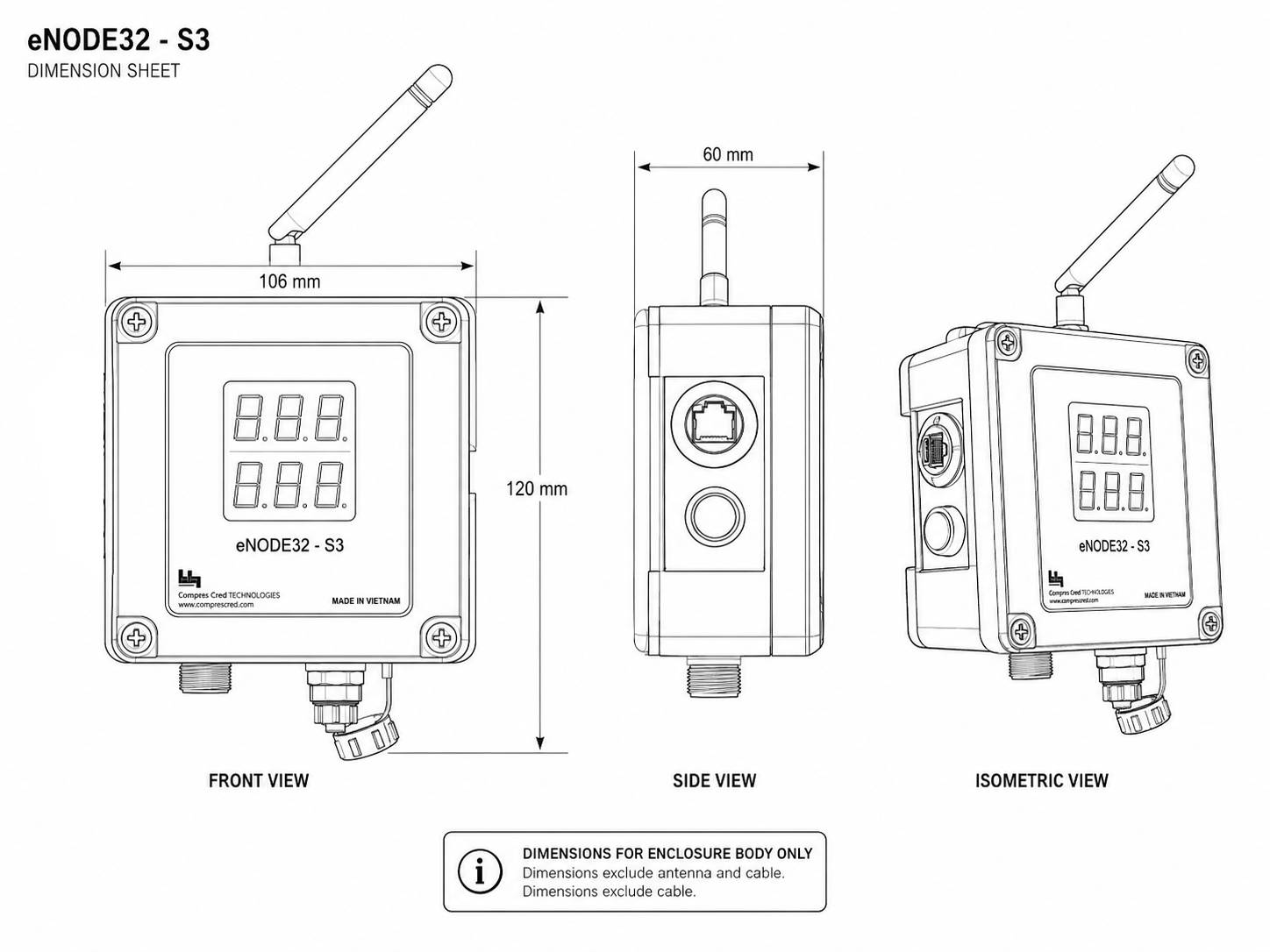
Use the drawing below for enclosure dimensions and mounting reference.Sử dụng bản vẽ dưới đây để tham khảo kích thước vỏ và vị trí lắp đặt.
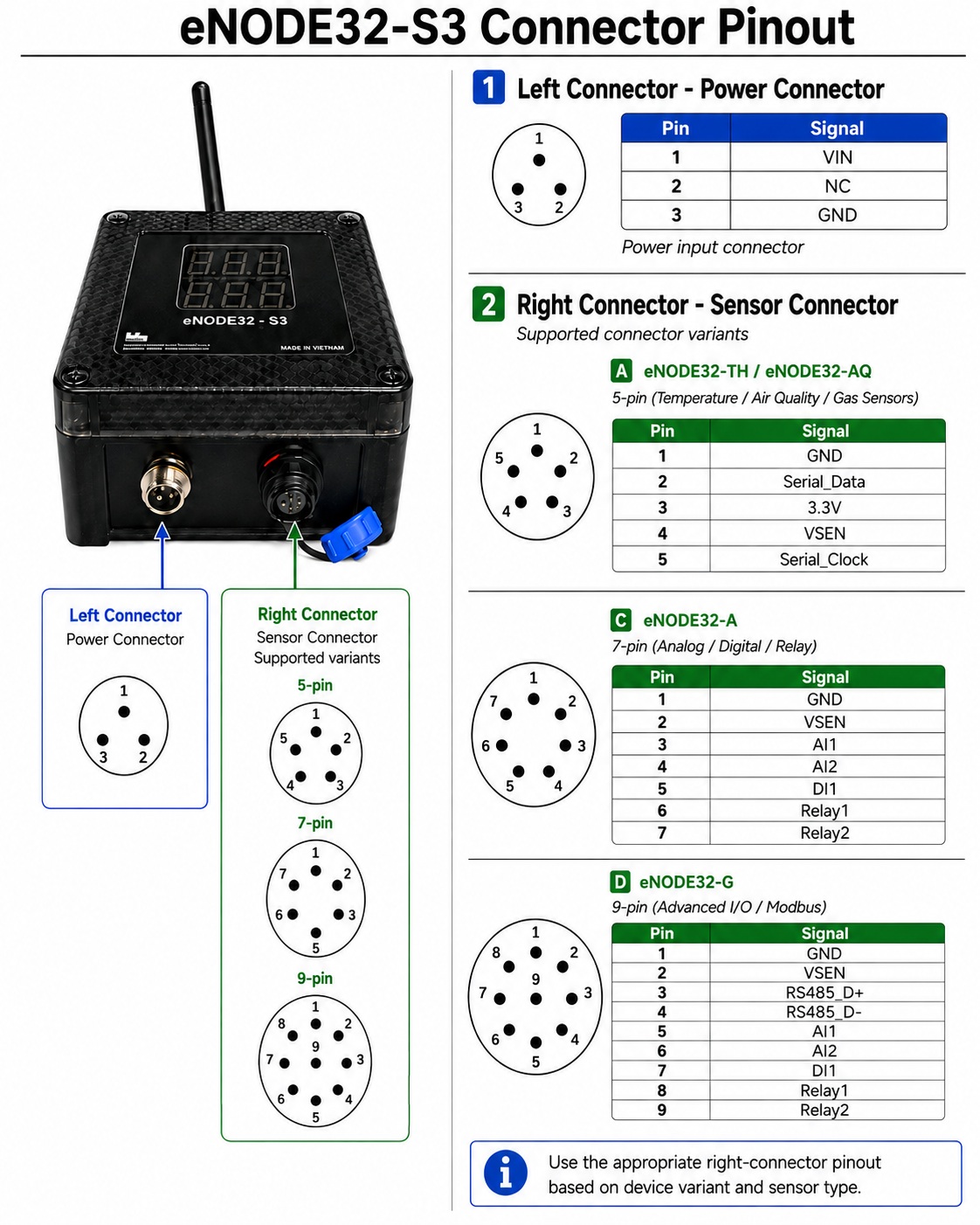
Use this current pinout drawing for all wiring. Verify the product label and connector before installation.Sử dụng sơ đồ chân hiện hành này cho mọi đấu nối. Kiểm tra tem sản phẩm và connector trước khi lắp đặt.