- OverviewTổng quan
- 1. General Overview1. Tổng quan
- 2. Key Features2. Tính năng chính
- 3. Applications3. Ứng dụng
- 4. System Architecture4. Kiến trúc hệ thống
- 5. Technical Specifications5. Thông số kỹ thuật
- 6. I/O Connections6. Đấu nối I/O
- 7. LED Status Indicators7. Đèn báo trạng thái
- 8. Network & Connectivity8. Mạng & kết nối
- 9. Software & Cloud Platform9. Phần mềm & Cloud
- 10. Ethernet Web Configuration10. Cấu hình Web Ethernet
uGW32 microGatewayuGW32 microGateway Micro I/O Industry GatewayGateway Công nhiệp nhỏ gọn
Compact industrial IoT gateway for analog 4–20 mA, digital I/O, and RS485 Modbus sensors. Uplink via WiFi or Ethernet to HBQconnect or a configured MQTT/HTTP server — with local web configuration and CSV bulk sensor import. Gateway IoT công nghiệp nhỏ gọn cho analog 4–20 mA, I/O số và cảm biến RS485 Modbus. Truyền dữ liệu qua WiFi hoặc Ethernet lên HBQconnect hoặc máy chủ MQTT/HTTP đã cấu hình — cấu hình web tại chỗ và nhập cảm biến hàng loạt qua CSV.
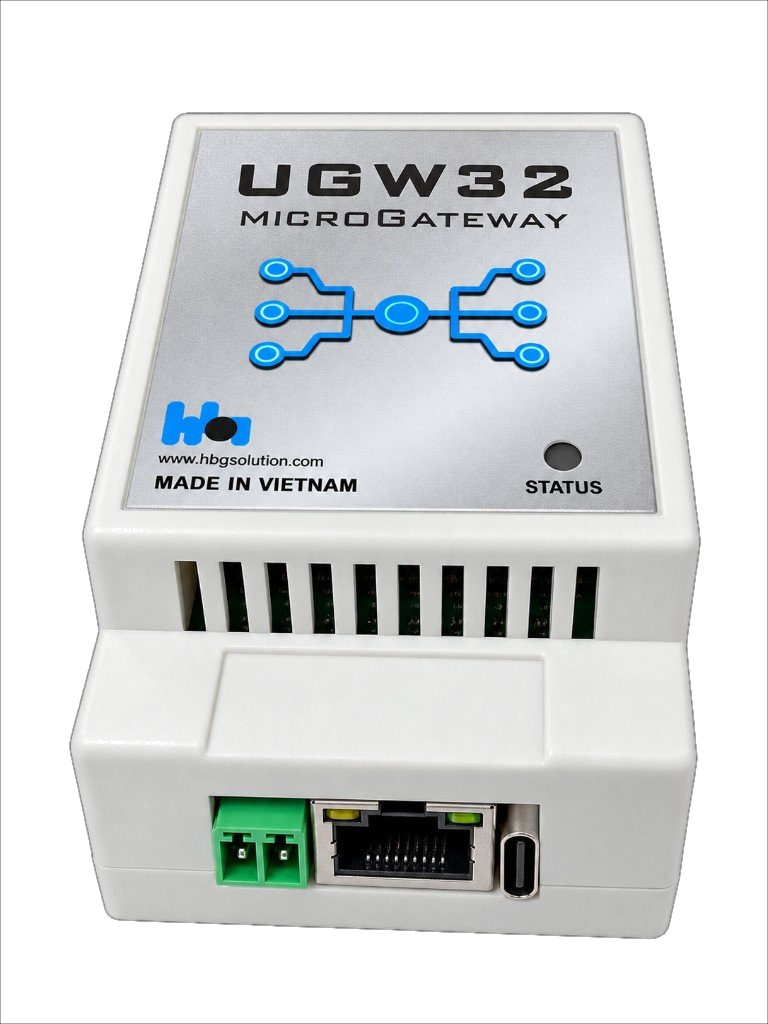
The uGW32 microGateway is a compact, multi-parameter industrial IoT device designed to measure and monitor signals from standard industrial I/O interfaces — including analog current loops (4–20 mA), digital inputs and outputs, and RS485 Modbus serial sensors.
uGW32 microGateway là thiết bị IoT công nghiệp đa thông số, nhỏ gọn, dùng để đo và giám sát tín hiệu từ các giao diện I/O tiêu chuẩn — bao gồm vòng dòng analog (4–20 mA), ngõ vào/ra số, và cảm biến serial RS485 Modbus.
Collected data is transmitted wirelessly over WiFi or through Ethernet (RJ45) to HBQ's cloud monitoring platform (HBQconnect) or a configured MQTT/HTTP server. The device can also be configured locally via the HBQ Mobile App using Bluetooth Low Energy (BLE).
Dữ liệu thu thập được truyền qua WiFi hoặc Ethernet (RJ45) lên nền tảng giám sát đám mây HBQconnect hoặc máy chủ MQTT/HTTP đã cấu hình. Thiết bị cũng có thể cấu hình tại chỗ qua ứng dụng HBQ Mobile bằng Bluetooth Low Energy (BLE).
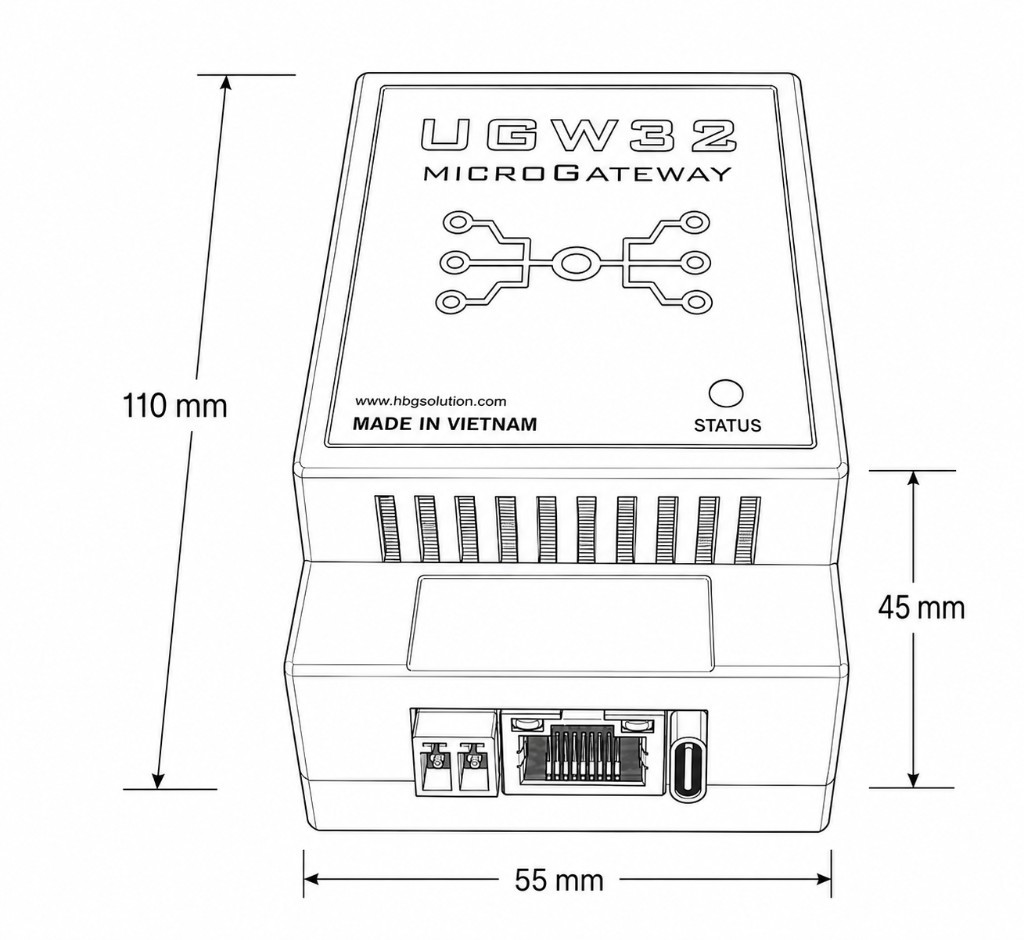
The device is housed in a white ABS enclosure for DIN-rail mounting in industrial panels. Body size: 110 × 55 × 45 mm. Hardware revision: Rev2.0 (13-pin field connector).
Thiết bị dùng vỏ ABS trắng, lắp thanh ray DIN trong tủ điện. Kích thước thân: 110 × 55 × 45 mm. Phần cứng: Rev2.0 (connector hiện trường 13 chân).
- Temperature & humidity monitoring — server rooms, pharmaceutical storage, industrial cold rooms
- Water infrastructure — pressure, flow rate, and pump monitoring at water treatment plants
- Smart agriculture — soil quality parameters (pH, moisture, nutrients) in precision farming
- Construction & environmental — vibration, noise levels, and air quality at construction sites
- Energy & power monitoring — current, voltage, and power quality in industrial facilities
- Wastewater & chemical monitoring — COD, SS, ammonia, T-N at treatment plants
- Giám sát nhiệt độ & độ ẩm — phòng server, kho dược phẩm, kho lạnh công nghiệp
- Hạ tầng nước — áp suất, lưu lượng, giám sát bơm tại nhà máy xử lý nước
- Nông nghiệp thông minh — pH, độ ẩm, dinh dưỡng đất trong nông nghiệp chính xác
- Xây dựng & môi trường — rung, tiếng ồn, chất lượng không khí tại công trường
- Giám sát năng lượng & điện — dòng, áp, chất lượng điện trong nhà máy
- Nước thải & hóa chất — COD, SS, ammonia, T-N tại trạm xử lý
MQTT · HTTP
Config only
| Parameter | Specification |
|---|---|
| Model | uGW32 |
| Power Supply | 5 – 30 VDC / 0.5 A |
| Analog Input (AI) | 2 × 4–20 mA current loop |
| Hardware revision | Rev2.0 — 13-position field connector (P1) |
| Digital Input (DI) | 4 × optocoupler-based (DI1–DI4) |
| Digital Output (DO) | 2 × optocoupler-based (DO1–DO2); load rating confirm with HBQ |
| Sensor Power Supply | VSEN: 12 VDC (continuous current: contact HBQ) |
| Serial Port | 1 × isolated RS485 (Modbus RTU Master) — A / B / GND_ISO |
| WiFi | IEEE 802.11 b/g/n, 2.4 GHz (external antenna) |
| Ethernet | 10/100 Mbps, RJ45 connector |
| Bluetooth | BLE (Bluetooth Low Energy) — device configuration only |
| Cloud Protocol | MQTT (primary); HTTP REST (optional) |
| Cloud Platform | Configurable MQTT/HTTP endpoints (HBQconnect, ThingsBoard, or custom) — verify integration per project |
| Operating Temperature | 0 °C to 50 °C |
| Enclosure Material | White ABS plastic |
| Dimensions (H × W × D) | 110 × 55 × 45 mm |
| Mounting | DIN-rail |
| Antenna | External (included) |
| LED Status Indicator | Yes (see Section 7) |
| Configuration Interface | Web browser via Ethernet RJ45 |
| Data Logging | Supported |
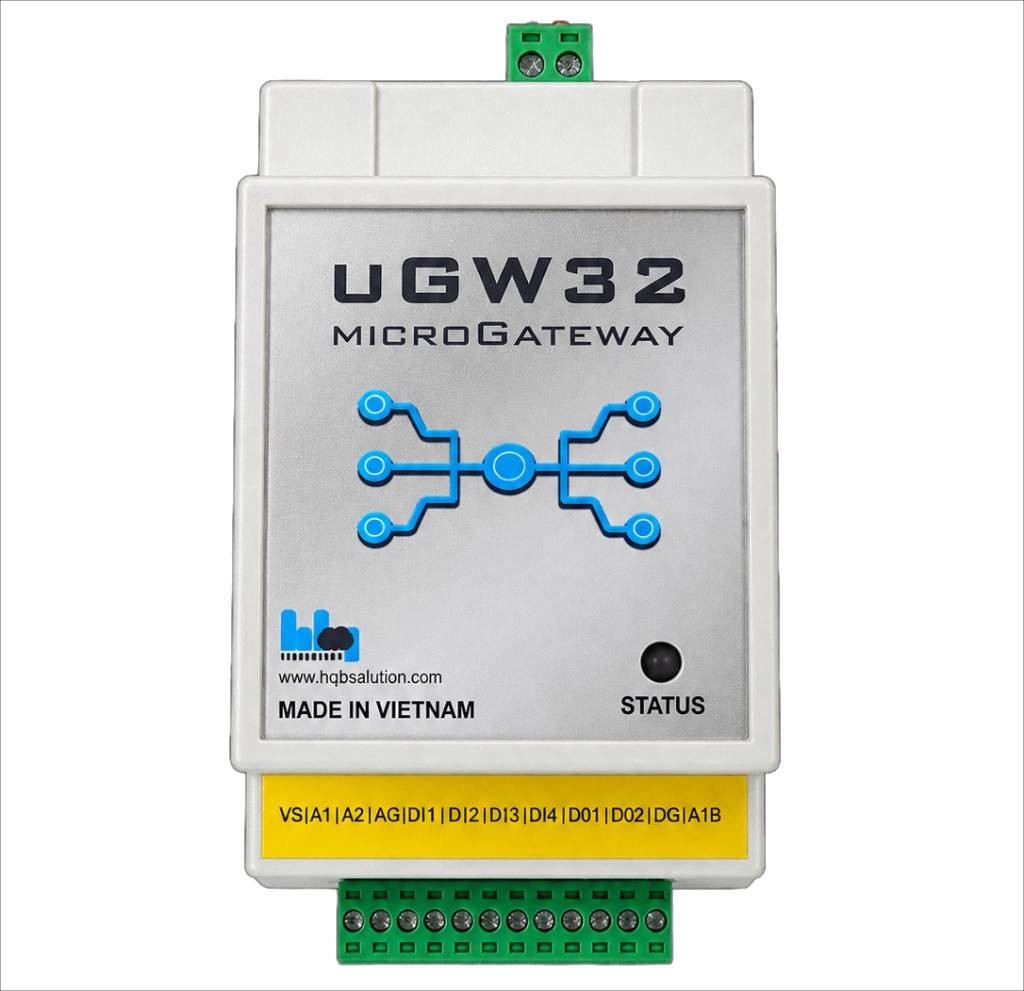
Rev2 uses a 13-position green pluggable terminal. View orientation: looking straight into the terminal openings. Official signal names below — do not use abbreviated yellow sticker text (VS, DG, …) as the wiring table.
Rev2 dùng terminal xanh 13 vị trí. Hướng nhìn: trực diện vào lỗ terminal. Tên tín hiệu chính thức bên dưới — không dùng chữ tắt trên tem vàng máy (VS, DG, …) làm bảng đấu dây.
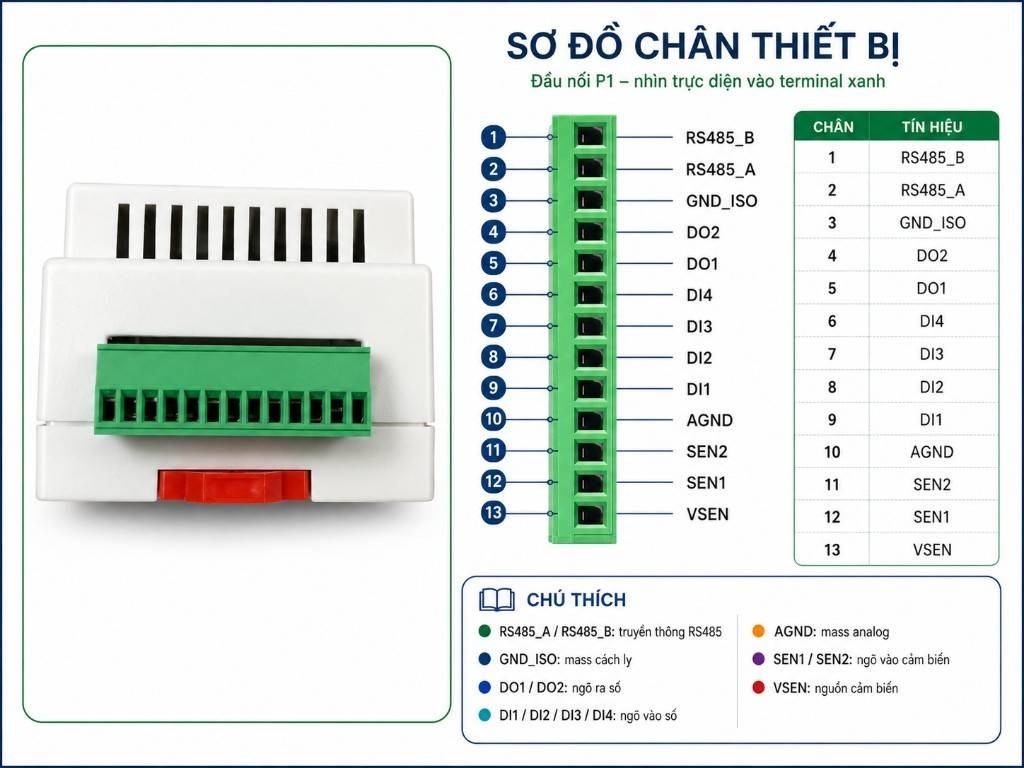
| Pin | Signal | DescriptionMô tả |
|---|---|---|
| 1 | RS485_B | RS485 B |
| 2 | RS485_A | RS485 A |
| 3 | GND_ISO | Isolated RS485 referenceMass RS485 cách ly |
| 4 | DO2 | Digital Output 2 |
| 5 | DO1 | Digital Output 1 |
| 6 | DI4 | Digital Input 4 |
| 7 | DI3 | Digital Input 3 |
| 8 | DI2 | Digital Input 2 |
| 9 | DI1 | Digital Input 1 |
| 10 | AGND | Analog groundMass analog |
| 11 | SEN2 | 4–20 mA Analog Input 2 |
| 12 | SEN1 | 4–20 mA Analog Input 1 |
| 13 | VSEN | 12 V sensor supplyNguồn cảm biến 12 V |
Connect 4–20 mA transmitters to SEN1 / SEN2 with return on AGND. VSEN provides 12 V to power external transmitters (continuous current: confirm with HBQ).
Đấu transmitter 4–20 mA vào SEN1 / SEN2, hồi về AGND. VSEN cấp 12 V cho transmitter ngoài (dòng liên tục: xác nhận với HBQ).
| Terminal | Signal | Description |
|---|---|---|
| Pin 10 | AGND | Analog GND |
| Pin 11 | SEN2 | 4–20 mA Analog Input 2 |
| Pin 12 | SEN1 | 4–20 mA Analog Input 1 |
| Pin 13 | VSEN | 12 V sensor supply |
Isolated RS485 for Modbus RTU Master. Terminate the bus with 120 Ω at both ends for long cables.
RS485 cách ly cho Modbus RTU Master. Đầu cuối bus 120 Ω hai đầu khi cáp dài.
| Terminal | Signal | Description |
|---|---|---|
| Pin 1 | RS485_B | RS485 B |
| Pin 2 | RS485_A | RS485 A |
| Pin 3 | GND_ISO | Isolated reference |
Four optocoupler-based digital inputs (DI1–DI4) on the Rev2 connector.
Bốn ngõ vào số opto (DI1–DI4) trên connector Rev2.
| Terminal | Signal | Description |
|---|---|---|
| Pin 6 | DI4 | Digital Input 4 |
| Pin 7 | DI3 | Digital Input 3 |
| Pin 8 | DI2 | Digital Input 2 |
| Pin 9 | DI1 | Digital Input 1 |
Two optocoupler-based digital outputs (DO1–DO2) for local alarm / actuator mapping. Load voltage/current rating: confirm with HBQ.
Hai ngõ ra số opto (DO1–DO2) cho cảnh báo / actuator tại chỗ. Rating tải: xác nhận với HBQ.
| Terminal | Signal | Description |
|---|---|---|
| Pin 4 | DO2 | Digital Output 2 |
| Pin 5 | DO1 | Digital Output 1 |
| LED Behavior | Meaning | Action Required |
|---|---|---|
| Short Pulse (5s) | Operating normally. Connected to Cloud. | None. |
| Slow Blink (1.5s) | Initializing or connecting to WiFi. | Wait for device to connect. |
| Medium Blink (0.3s) | WiFi connected, connecting to MQTT Server. | Wait for device to connect. |
| Fast Blink (0.1s) | Network error (WiFi/Ethernet disconnected). | Check credentials or network cable. |
| Solid ON (1.5s) | Operation failed (Invalid configuration). | Check your command/input. |
| Quick Double Blink | Operation successful (Settings saved). | None. |
| Double Blink (1.5s cycle) | Idle / Initialization mode. | Configure network settings. |
Supports IEEE 802.11 b/g/n at 2.4 GHz using an external antenna. Connect to any standard WPA2-secured access point. Place the device within line-of-sight of the router or use the external antenna to improve reception inside enclosed panels.
Hỗ trợ IEEE 802.11 b/g/n băng tần 2.4 GHz với ăng-ten ngoài. Kết nối điểm truy cập WPA2 tiêu chuẩn. Đặt thiết bị trong tầm nhìn router hoặc dùng ăng-ten ngoài trong tủ kín.
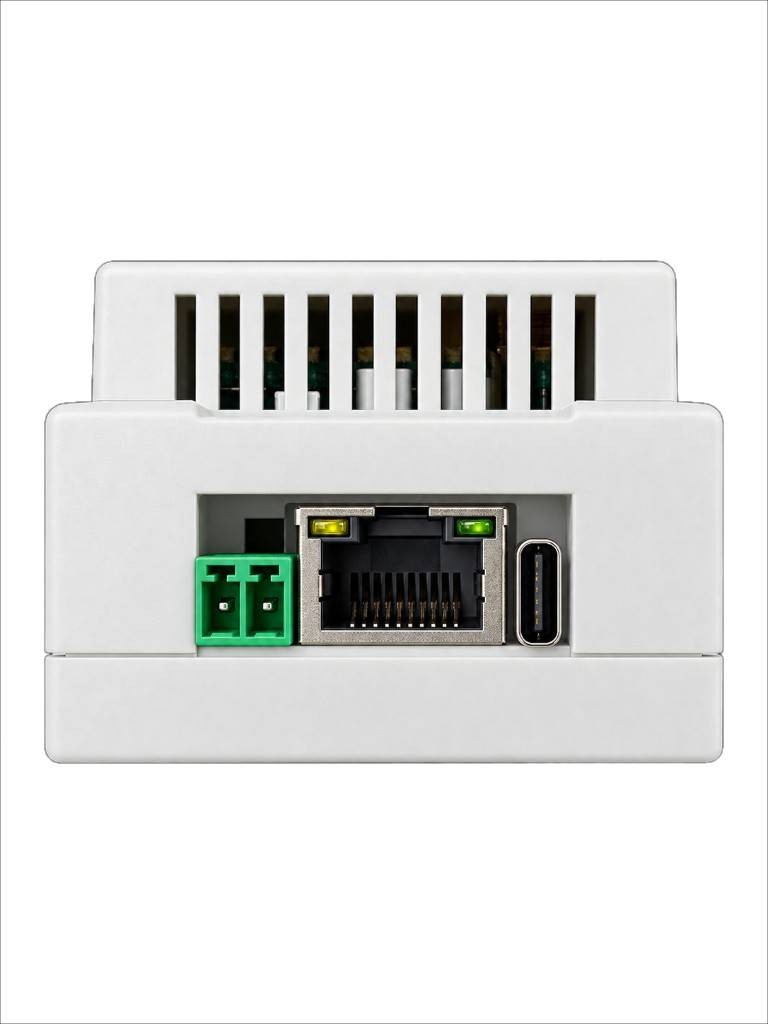
A 10/100 Mbps Ethernet RJ45 port provides wired LAN connectivity for environments where WiFi is unreliable or restricted. The Ethernet port is also used for web-based device configuration (see Section 10).
Cổng Ethernet RJ45 10/100 Mbps cung cấp kết nối LAN có dây khi WiFi không ổn định. Cổng này cũng dùng để cấu hình web (xem Mục 10).
BLE enables a direct, short-range connection (up to ~10 m) between the uGW32 and the HBQ Mobile App, used exclusively for device setup and configuration. BLE does not support real-time monitoring or local data access. Use cases include:
BLE cho phép kết nối trực tiếp tầm gần (~10 m) giữa uGW32 và ứng dụng HBQ Mobile, chỉ dùng để cài đặt và cấu hình. BLE không hỗ trợ giám sát thời gian thực. Các trường hợp dùng:
- Initial device configuration and network setup during installation
- On-site parameter adjustment and calibration
- Quick commissioning without a laptop or Ethernet cable
- Cấu hình ban đầu và thiết lập mạng khi lắp đặt
- Hiệu chỉnh thông số tại chỗ
- Commissioning nhanh không cần laptop hoặc cáp Ethernet
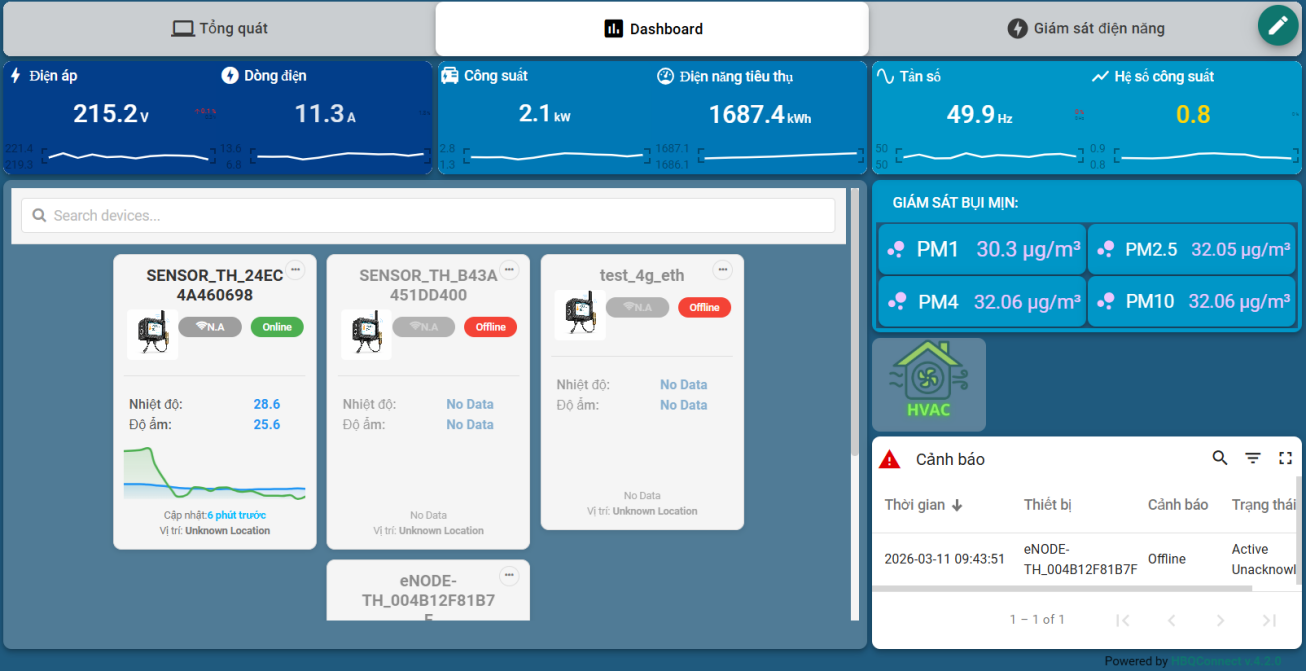
- Real-time sensor charts and gauges
- Multi-device management
- Configurable alarm rules and notifications
- Historical data export (day / month / year)
- Role-based user access control
- Biểu đồ và đồng hồ cảm biến thời gian thực
- Quản lý nhiều thiết bị
- Quy tắc cảnh báo và thông báo cấu hình được
- Xuất dữ liệu lịch sử (ngày / tháng / năm)
- Phân quyền người dùng theo vai trò
- Connect directly via Bluetooth BLE
- Configure WiFi, MQTT server, and sensor parameters
- Adjust alarm thresholds and calibration on-site
- View device status and connection health
- Works without internet — BLE only
- Kết nối trực tiếp qua Bluetooth BLE
- Cấu hình WiFi, MQTT và thông số cảm biến
- Điều chỉnh ngưỡng cảnh báo và hiệu chuẩn tại chỗ
- Xem trạng thái thiết bị và kết nối
- Hoạt động không cần Internet — chỉ BLE
The uGW32 microGateway features a built-in, responsive web interface for easy configuration and diagnostics directly from any browser over a local Ethernet connection. Connect the gateway's RJ45 port to your PC or local switch, power on the device, and log in with your credentials.
uGW32 microGateway có giao diện web tích hợp, hỗ trợ cấu hình và chẩn đoán trực tiếp từ trình duyệt qua kết nối Ethernet cục bộ. Cắm cổng RJ45 vào PC hoặc switch, bật nguồn thiết bị và đăng nhập bằng tài khoản của bạn.
Always change the default administrator password on your first login under the System Config tab to secure the device from unauthorized access on the local network.
Luôn đổi mật khẩu quản trị mặc định ngay lần đăng nhập đầu tiên tại tab System Config để bảo vệ thiết bị khỏi truy cập trái phép trên mạng nội bộ.
The monitoring dashboard displays the real-time operational status of all I/O interfaces, system telemetry, and network connections. It is the primary window for operational validation and signal checkouts.
Bảng giám sát hiển thị trạng thái vận hành theo thời gian thực của mọi giao diện I/O, telemetry hệ thống và kết nối mạng. Đây là cửa sổ chính để kiểm tra tín hiệu và xác nhận vận hành.
- Analyze Analog Signals (AI1, AI2): View exact current loop values in mA and their mapped physical measurements (e.g., pressure, temperature).
- Track Digital Inputs (DI1, DI2): Real-time high/low logic indicator for isolated digital status tracking.
- Monitor Outputs & Network: Verify actual DO1/DO2 relay states, real-time wireless RSSI levels, and the gateway's continuous Uptime.
- Phân tích tín hiệu Analog (AI1, AI2): Xem giá trị dòng mA và đại lượng vật lý đã quy đổi (áp suất, nhiệt độ,…).
- Theo dõi Digital Input (DI1, DI2): Chỉ báo logic cao/thấp theo thời gian thực cho ngõ vào số cách ly.
- Giám sát ngõ ra & mạng: Kiểm tra trạng thái DO1/DO2, cường độ WiFi RSSI và thời gian hoạt động (Uptime) của gateway.
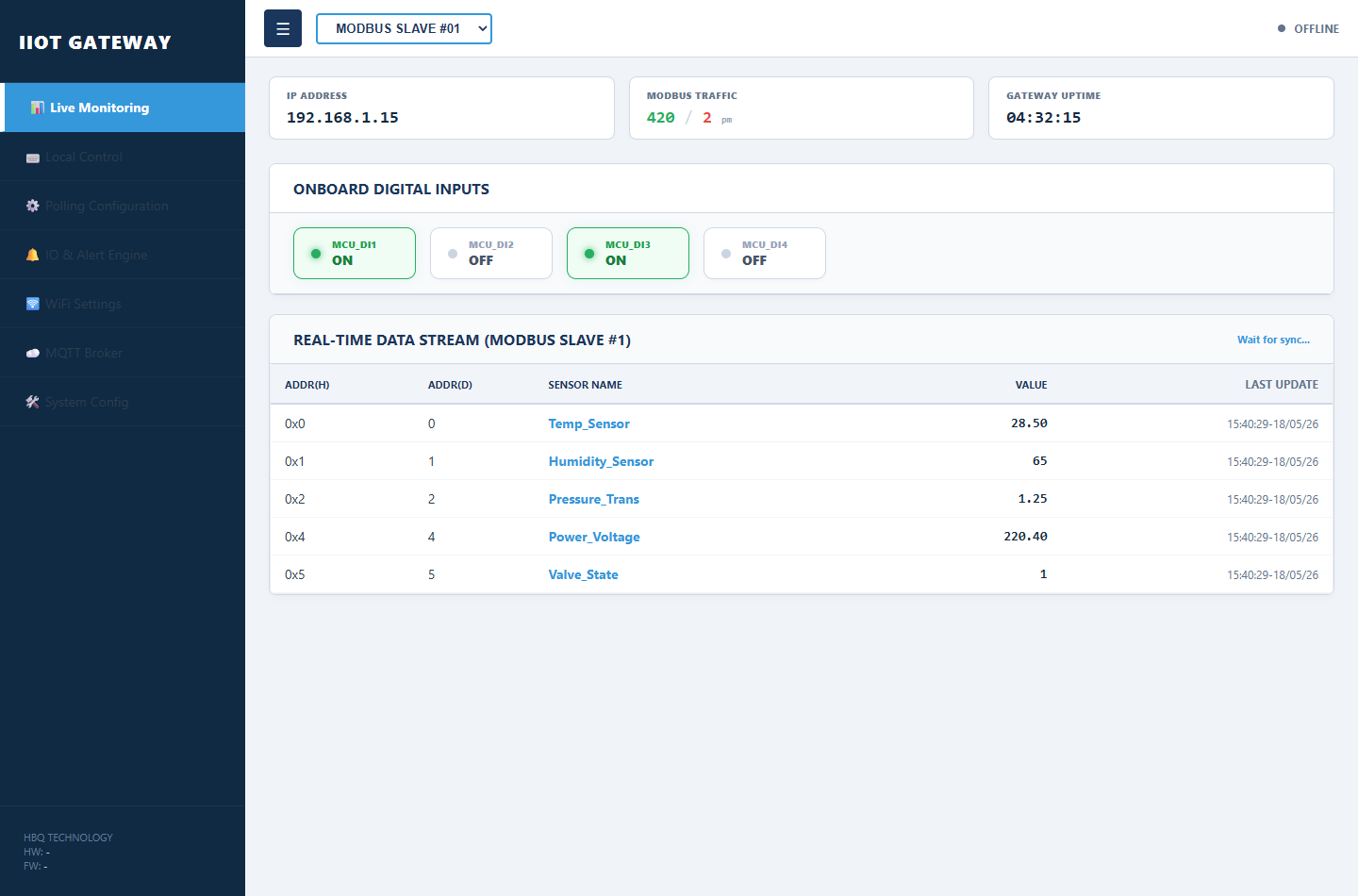
Enables manual override and testing of physical digital outputs. Highly useful during setup for testing connected warning lights, sirens, valves, or relays.
Cho phép điều khiển cưỡng bức và kiểm tra ngõ ra số. Rất hữu ích khi lắp đặt để thử đèn cảnh báo, còi, van hoặc rơ-le.
- Select Target Channel: Choose the specific output (DO1 or DO2) to command.
- Toggle Control Mode: Switch from automatic rule-based execution to manual override mode.
- Execute Commands: Slide the virtual switch to trigger the output state ON or OFF instantly.
- Chọn kênh đích: Chọn ngõ ra cần điều khiển (DO1 hoặc DO2).
- Chuyển chế độ: Chuyển từ chạy tự động theo quy tắc sang điều khiển thủ công.
- Thực thi lệnh: Gạt công tắc ảo để bật/tắt ngõ ra ngay lập tức.
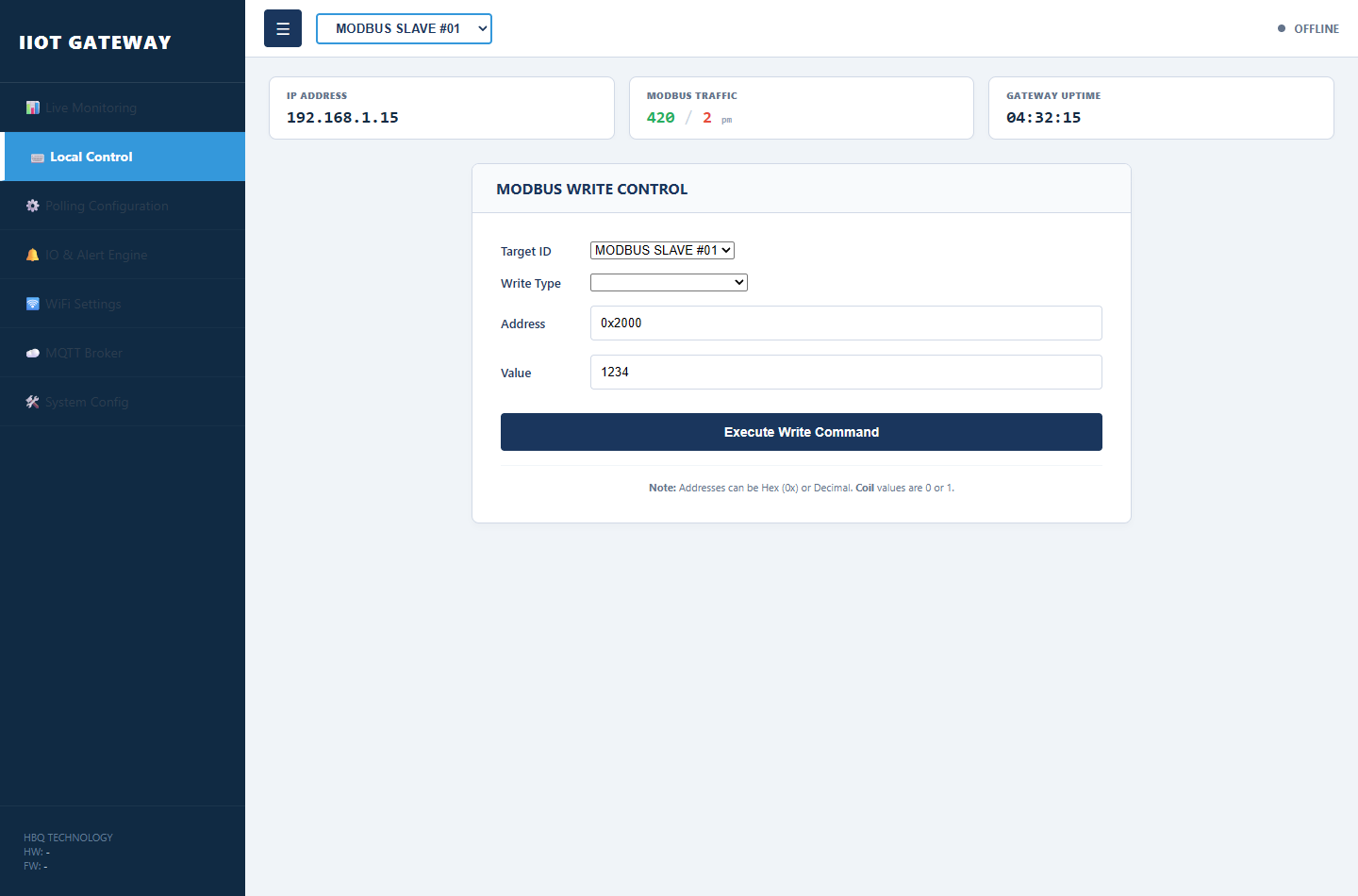
Configure the gateway to poll industrial sensors, PLCs, or meters on the RS485 bus. The gateway operates as a Modbus Master, polling mapped registers automatically. Up to 20 sensors per slave ID can be defined manually or imported in bulk via CSV (see Section 10.4).
Cấu hình gateway để quét cảm biến công nghiệp, PLC hoặc đồng hồ trên bus RS485. Gateway hoạt động ở chế độ Modbus Master, tự động đọc các thanh ghi đã ánh xạ. Tối đa 20 cảm biến cho mỗi Slave ID có thể nhập thủ công hoặc nhập hàng loạt qua CSV (xem Mục 10.4).
- Manual Entry: Add each sensor row with name, Modbus address, data type, register type, endianness, bit offset, and enable state.
- Bulk CSV Import: Click Import CSV on the Polling Configuration tab to load a pre-built register map from a spreadsheet.
- Apply & Save: Click Apply All to push rows to RAM, then Save All to Flash to persist after power cycle.
- Nhập thủ công: Thêm từng dòng cảm biến với tên, địa chỉ Modbus, kiểu dữ liệu, loại thanh ghi, endian, bit offset và trạng thái kích hoạt.
- Nhập CSV hàng loạt: Bấm Import CSV trên tab Polling Configuration để tải bản đồ thanh ghi từ file bảng tính.
- Áp dụng & Lưu: Bấm Apply All để đẩy cấu hình vào RAM, sau đó Save All to Flash để lưu vĩnh viễn.
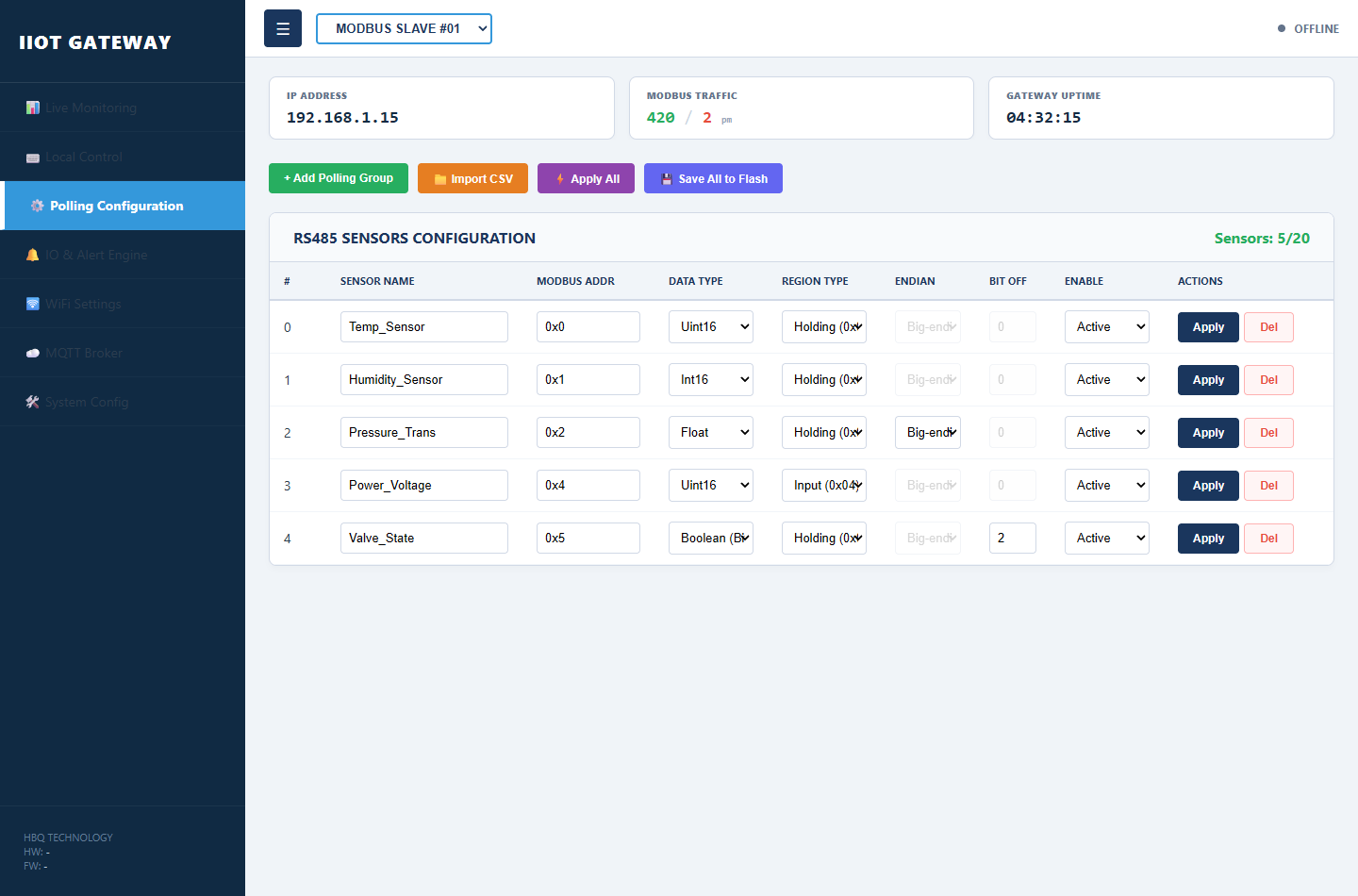
The Polling Configuration tab includes an Import CSV button that loads up to 20 RS485 sensor definitions at once. Firmware V2.1 requires a strict 7-column header and validates each row before appending to the current list.
Tab Polling Configuration có nút Import CSV để tải tối đa 20 cấu hình cảm biến RS485 cùng lúc. Firmware V2.1 yêu cầu dòng tiêu đề 7 cột chính xác và kiểm tra từng dòng trước khi thêm vào danh sách hiện tại.
Row 1 must be exactly:
Dòng đầu tiên phải chính xác:
Import WorkflowQuy trình nhập
- Prepare the file: Use Sensor_Import_Template_V2.1.csv as a starting point. Lines starting with
//are ignored. - Import CSV: On Polling Configuration, click 📁 Import CSV and select your file. If sensors already exist, choose OK to clear the list first or Cancel to append.
- Apply All: Push every row to gateway RAM. The web UI pauses background polling during this step.
- Save All to Flash: Persist the configuration so it survives reboot and power loss.
- Chuẩn bị file: Dùng Sensor_Import_Template_V2.1.csv làm mẫu. Các dòng bắt đầu bằng
//sẽ bị bỏ qua. - Import CSV: Tại tab Polling Configuration, bấm 📁 Import CSV và chọn file. Nếu đã có cảm biến, chọn OK để xóa danh sách cũ hoặc Cancel để thêm tiếp.
- Apply All: Đẩy toàn bộ dòng cấu hình vào RAM của gateway. Giao diện web tạm dừng polling nền trong bước này.
- Save All to Flash: Lưu cấu hình để giữ lại sau khi khởi động lại hoặc mất điện.
Column ReferenceTra cứu các cột
| ColumnCột | FieldTrường | DescriptionMô tả |
|---|---|---|
| 1 | Name |
Sensor label (max 20 chars: a-z, A-Z, 0-9, _, -). Used in monitoring and MQTT.Tên cảm biến (tối đa 20 ký tự: a-z, A-Z, 0-9, _, -). Dùng trong giám sát và MQTT. |
| 2 | Address |
Modbus register address — hex (0x0001) or decimal (1).Địa chỉ thanh ghi Modbus — hex (0x0001) hoặc thập phân (1). |
| 3 | Type |
Data type index — see table below.Chỉ số kiểu dữ liệu — xem bảng bên dưới. |
| 4 | RegType |
0 = Holding (FC 03), 1 = Input (FC 04).0 = Holding (FC 03), 1 = Input (FC 04). |
| 5 | Endian |
Byte order for 32-bit types only (Type 2, 3, 4). Use 0 for 16-bit and Boolean.Thứ tự byte — chỉ cho kiểu 32-bit (Type 2, 3, 4). Kiểu 16-bit và Boolean để 0. |
| 6 | BitOff |
Bit position 0–15. Only used when Type = 5 (Boolean).Vị trí bit 0–15. Chỉ dùng khi Type = 5 (Boolean). |
| 7 | Active |
1 = enabled, 0 = disabled.1 = bật, 0 = tắt. |
1. Data Type (Column 3 — Type)1. Kiểu dữ liệu (Cột 3 — Type)
| ValueGiá trị | TypeKiểu | NotesGhi chú |
|---|---|---|
| 0 | Uint16 | Unsigned 16-bit integer (1 register)Số nguyên không dấu 16-bit (1 thanh ghi) |
| 1 | Int16 | Signed 16-bit integer (1 register)Số nguyên có dấu 16-bit (1 thanh ghi) |
| 2 | Uint32 | Unsigned 32-bit integer (2 registers)Số nguyên không dấu 32-bit (2 thanh ghi) |
| 3 | Int32 | Signed 32-bit integer (2 registers)Số nguyên có dấu 32-bit (2 thanh ghi) |
| 4 | Float | IEEE 754 32-bit float (2 registers) — common for process sensorsSố thực IEEE 754 32-bit (2 thanh ghi) — thường dùng cho cảm biến quy trình |
| 5 | Boolean | Single bit read — set BitOff columnĐọc 1 bit — cấu hình cột BitOff |
2. Register Type (Column 4 — RegType)2. Loại thanh ghi (Cột 4 — RegType)
| ValueGiá trị | RegisterThanh ghi | ModbusModbus |
|---|---|---|
| 0 | Holding Register | Read/write area (Function Code 0x03)Vùng đọc/ghi (Function Code 0x03) |
| 1 | Input Register | Read-only area (Function Code 0x04)Vùng chỉ đọc (Function Code 0x04) |
3. Byte Order (Column 5 — Endian)3. Thứ tự byte (Cột 5 — Endian)
Applies only to 32-bit types (Type 2, 3, 4).Chỉ áp dụng cho kiểu 32-bit (Type 2, 3, 4).
| ValueGiá trị | FormatĐịnh dạng | DescriptionMô tả |
|---|---|---|
| 0 | ABCD | Big-endian (default)Big-endian (mặc định) |
| 1 | CDAB | Word swapHoán đổi word |
| 2 | BADC | Byte swapHoán đổi byte |
| 3 | DCBA | Little-endianLittle-endian |
Sample CSV FileVí dụ file CSV
Nhiet_Do,0x0001,4,0,0,0,1
Do_Am,0x0002,0,1,0,0,1
Trang_Thai_Bom,0x0005,5,0,0,1,1
Trang_Thai_Bom reads bit 1 from Holding register 0x0005 as a Boolean status flag.Trang_Thai_Bom đọc bit 1 từ thanh ghi Holding 0x0005 như cờ trạng thái Boolean.
Maximum 20 active sensors per Modbus slave. If the header row does not match exactly, the import is rejected with an error dialog. After changing sensor names, review Alert rules — missing sensors are auto-disabled on Apply All.
Tối đa 20 cảm biến đang bật cho mỗi Slave Modbus. Nếu dòng tiêu đề không khớp chính xác, import sẽ bị từ chối. Sau khi đổi tên cảm biến, kiểm tra lại quy tắc Cảnh báo — cảm biến không tồn tại sẽ tự tắt khi Apply All.
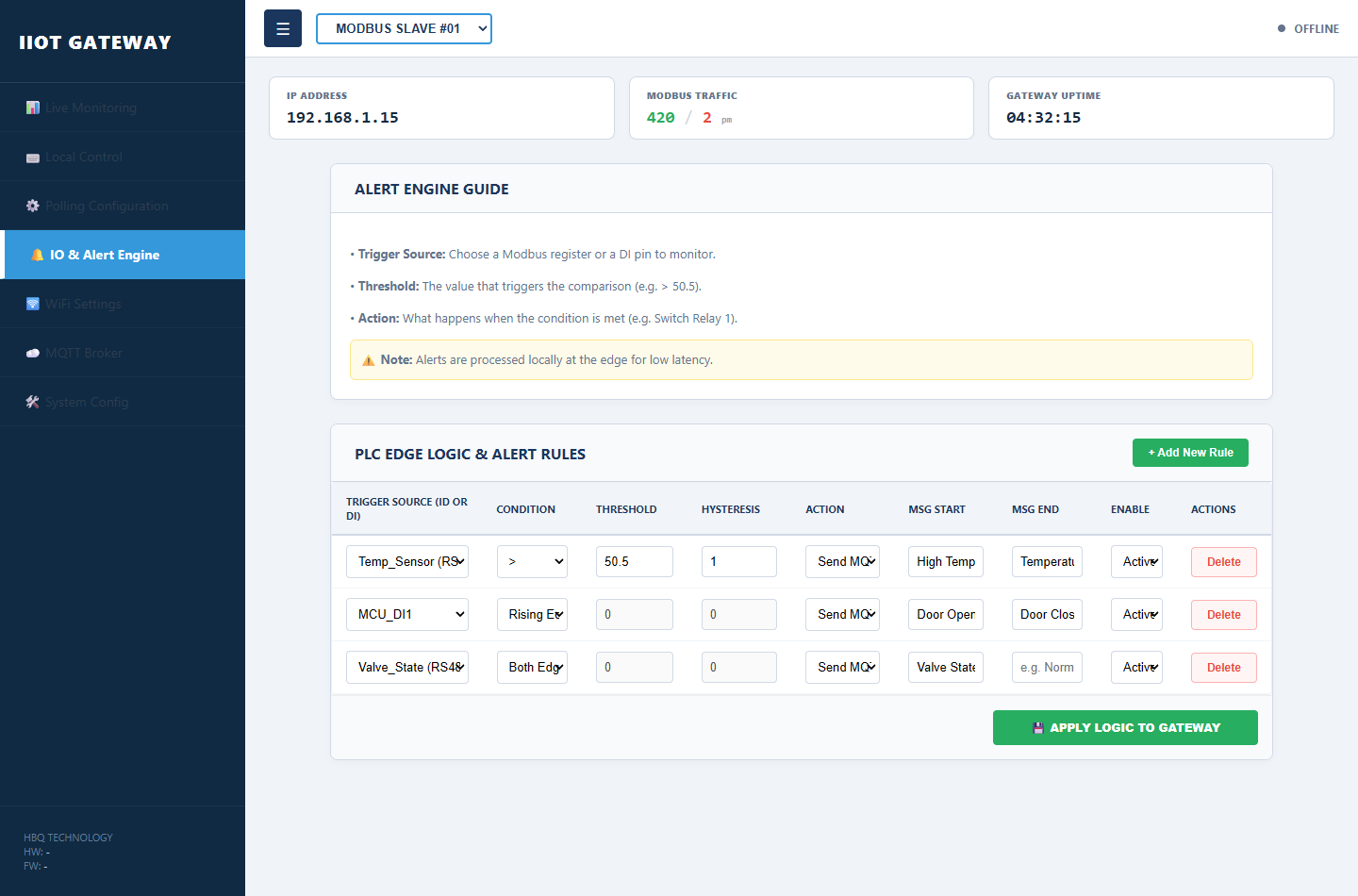
Define automated local logic rules. The gateway executes these limits at the edge, allowing instant local alarm activation even during internet dropouts.
Định nghĩa quy tắc logic cục bộ tự động. Gateway thực thi tại biên, kích hoạt cảnh báo tức thì ngay cả khi mất Internet.
- Target Specific Inputs: Choose any Analog channel or polled Modbus register as the monitoring source.
- Define High/Low Limits: Set precise numerical thresholds to trigger warnings or safety responses.
- Map Alarm Output & Delays: Bind rules to automatically trigger DO1/DO2 and define delay filters to prevent false alarms.
- Chọn nguồn giám sát: Kênh Analog hoặc thanh ghi Modbus đã quét.
- Đặt ngưỡng trên/dưới: Thiết lập ngưỡng số chính xác để kích hoạt cảnh báo hoặc an toàn.
- Ánh xạ ngõ ra & trễ: Gán quy tắc kích DO1/DO2 và thời gian trễ lọc nhiễu.
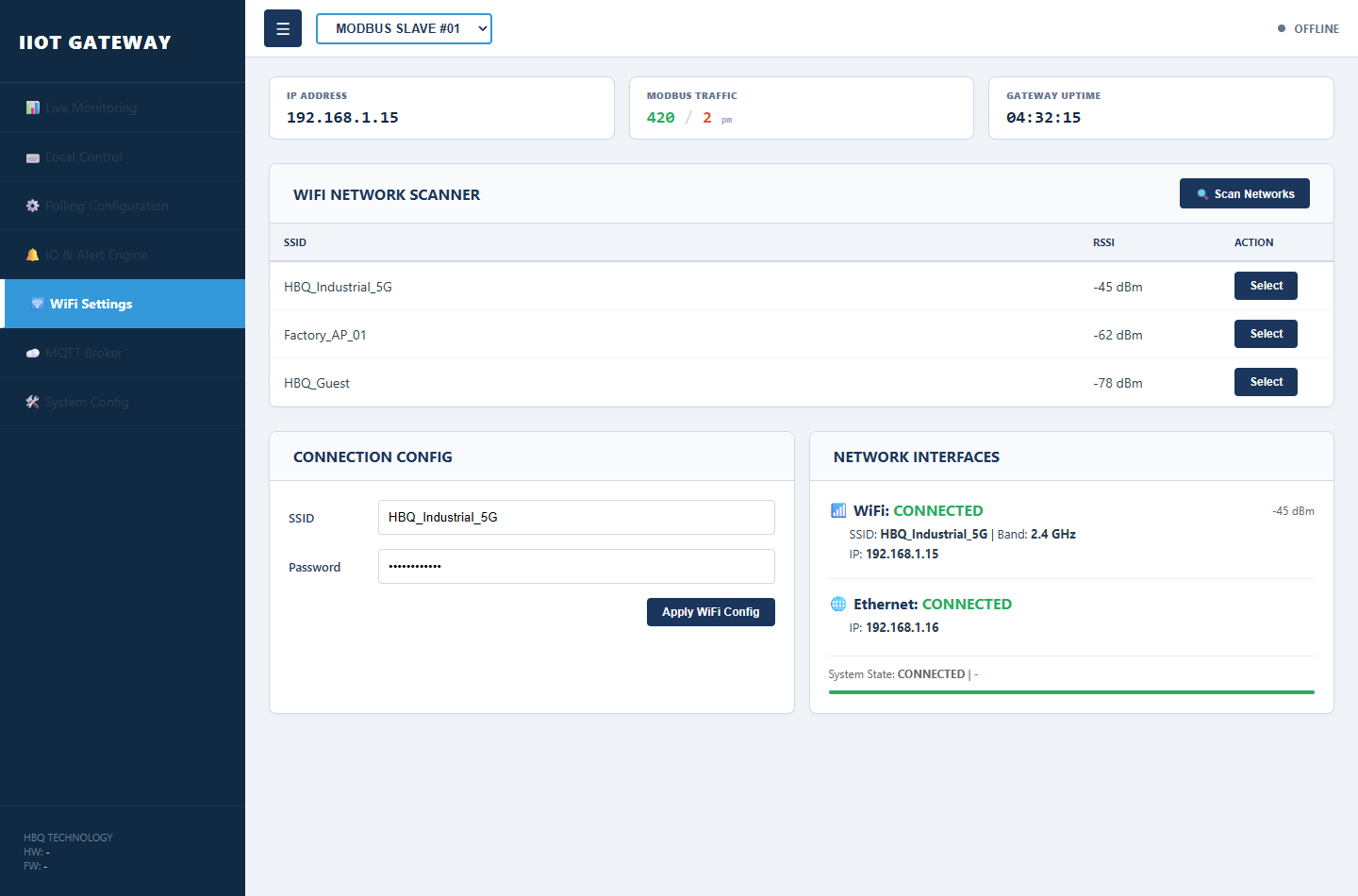
Configure the physical interfaces linking the gateway to the cloud. Supports dual failover options for redundant internet routing.
Cấu hình giao diện vật lý kết nối gateway lên cloud. Hỗ trợ chuyển đổi dự phòng giữa WiFi và Ethernet.
- Set WiFi SSID & Pass: Search for local industrial 2.4 GHz Access Points and input secure security keys.
- Ethernet Configuration: Enable DHCP to automatically obtain IP addresses or set Static IP, Netmask, and DNS servers.
- Save & Reboot: Commit the networking configuration to initiate secure handshakes with the gateway's routing switch.
- Cài WiFi SSID & mật khẩu: Quét mạng 2.4 GHz và nhập khóa bảo mật.
- Cấu hình Ethernet: Bật DHCP hoặc đặt IP tĩnh, subnet mask và DNS.
- Lưu & khởi động lại: Lưu cấu hình mạng để gateway kết nối ổn định.
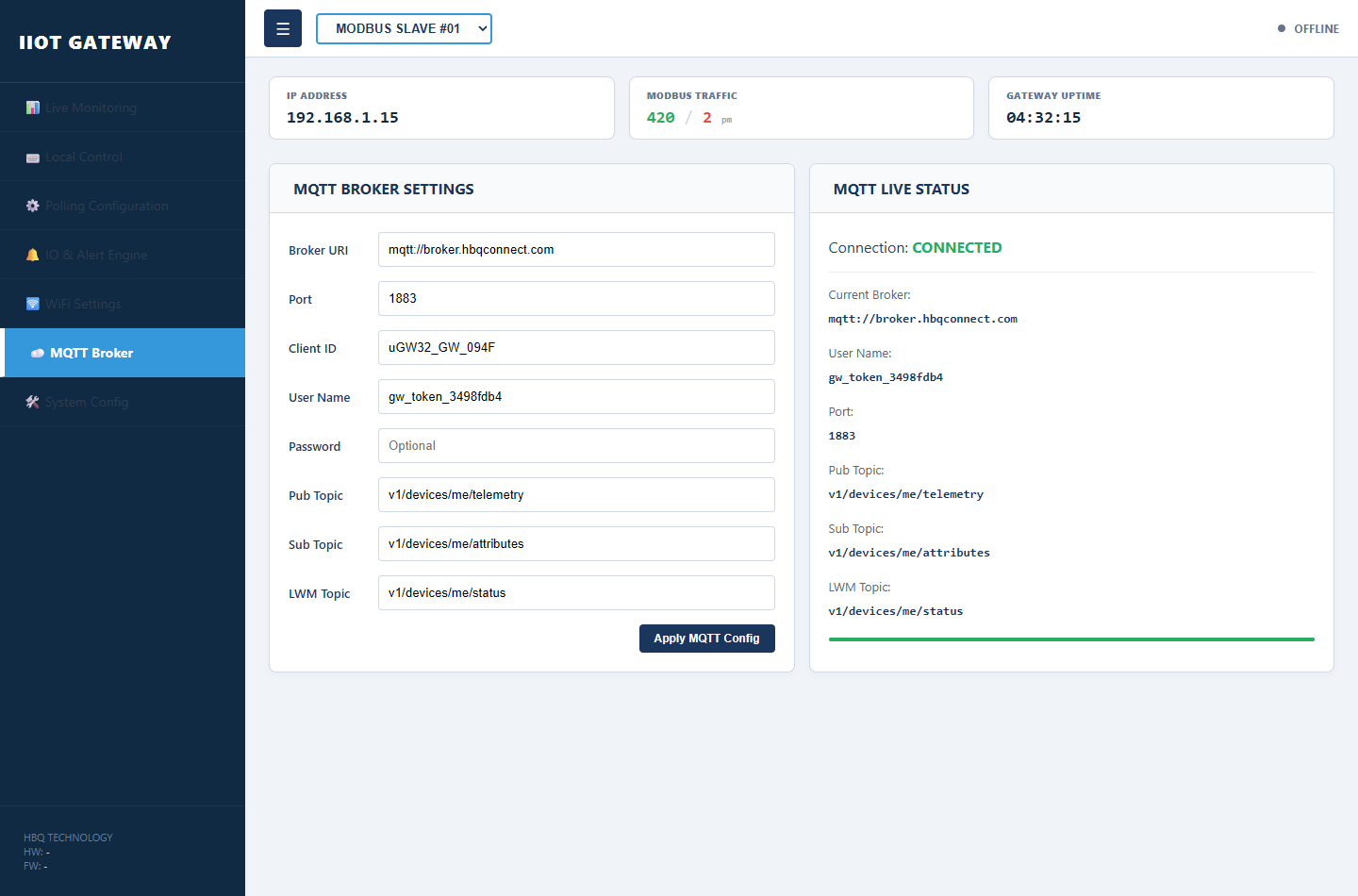
Establish the main uplink channel for telemetry data sync. Connects the gateway directly to cloud brokers like HBQconnect or public servers.
Thiết lập kênh uplink chính đồng bộ telemetry. Kết nối gateway tới broker cloud như HBQconnect hoặc máy chủ công cộng.
- Enter Broker Credentials: Define host URL or IP, and port (standard 1883 or encrypted SSL/TLS 8883).
- Input Authentication: Enter the unique Client ID, Username, and Password allocated by your system administrator.
- Map Topic Mappings: Define custom JSON telemetry publish and command subscription topics to match your system.
- Nhập thông tin Broker: URL/IP và cổng (1883 hoặc SSL/TLS 8883).
- Xác thực: Client ID, Username và Password do quản trị cấp.
- Ánh xạ Topic: Topic publish telemetry và subscribe lệnh điều khiển.
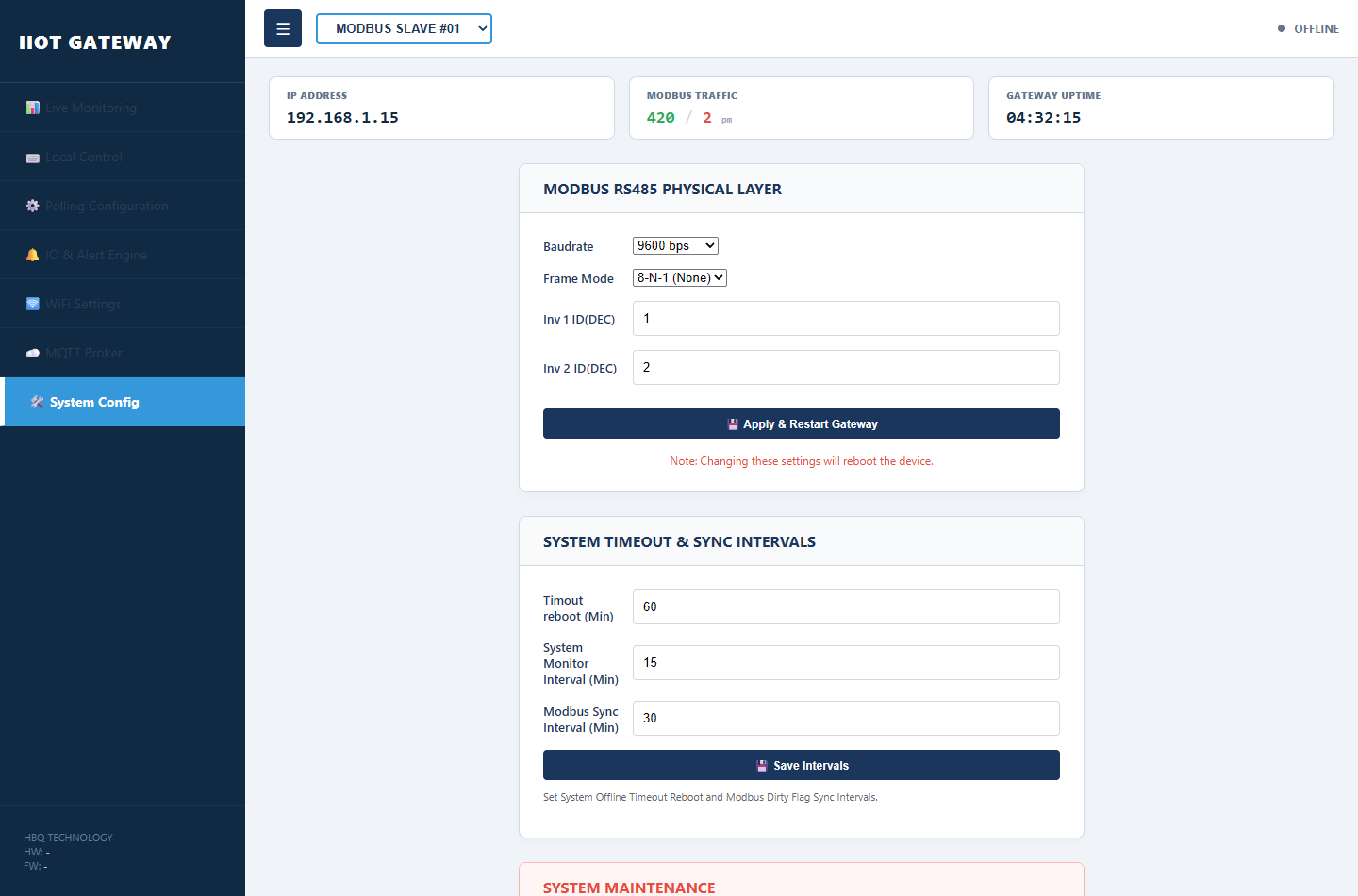
Access primary device utilities and maintenance options. Crucial for hardware setup, updating settings, and backup management.
Truy cập tiện ích và bảo trì thiết bị: cài đặt phần cứng, cập nhật cấu hình và sao lưu.
- Time & NTP Synchronization: Sync with global NTP servers and set local offsets to secure exact telemetry timestamps.
- Firmware & Configuration Backups: Backup active configurations to local storage or upgrade system software via Over-The-Air (OTA).
- Reboot & Admin Control: Trigger system reboot or update administrator passwords for robust device-level security.
- Đồng bộ NTP: Đồng bộ thời gian với máy chủ NTP để timestamp chính xác.
- Sao lưu & firmware: Backup cấu hình hoặc nâng cấp firmware qua OTA.
- Khởi động lại & quản trị: Reboot hệ thống hoặc đổi mật khẩu admin.