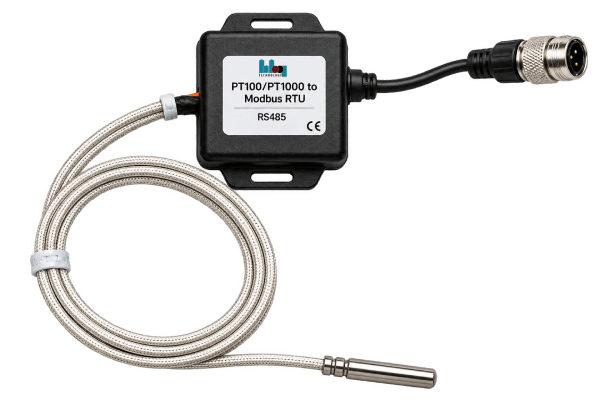
Hardware Specifications
Thông số phần cứng
Electrical, communication, and mechanical parameters for the PT100/PT1000 Modbus RTU converter module.
Thông số điện, truyền thông và cơ khí của module chuyển đổi PT100/PT1000 Modbus RTU.
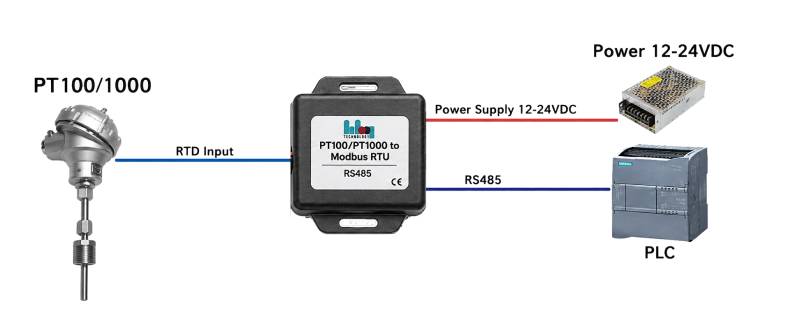
Typical application diagram for PT100 to Modbus RTU converter in an industrial RS-485 network.
Sơ đồ ứng dụng điển hình cho bộ chuyển đổi PT100 sang Modbus RTU trong mạng RS-485 công nghiệp.
Core ProcessingXử lý lõi
MCUIndustrial 32-bit Low-power MCUMCU 32-bit công nghiệp tiêu thụ thấp
ResolutionĐộ phân giải15-bit (P) / 16-bit Oversampled (E)15-bit (P) / 16-bit Oversampled (E)
Response TimeThời gian phản hồi< 50 ms (at 9600 bpsở 9600 bps)
Update RateTần số cập nhật10 Hz tođến 16.6 Hz
CommunicationTruyền thông
InterfaceGiao tiếpRS-485 Half-Duplex (Isolated)RS-485 bán song công (cách ly)
ProtocolGiao thứcModbus RTU Slave (8N1, 8E1, …)
BaudrateTốc độ baud9600 tođến 115200 bps
Network CapacitySố node mạngUp to 32 nodes per segmentTối đa 32 node / đoạn bus
Measurement RangeDải đo
PT100-E-40 °C tođến +250 °C (±0.25 °C)
PT100-P-50 °C tođến +300 °C (±0.15 °C)
PT1000-P-50 °C tođến +300 °C (±0.15 °C)
ExcitationKích thíchClean Current Source (MCU Ctrl)Nguồn dòng sạch (điều khiển MCU)
Power SystemHệ thống nguồn
Input VoltageĐiện áp vào7~36V DC (Optimal: 12VTối ưu: 12V)
ConsumptionTiêu thụ< 30 mA (at 24Vở 24V)
Operating TempNhiệt độ làm việc-20 °C tođến +85 °C
MountingLắp đặtScrew mountVặn ốc
Ordering Information & SKUs
Thông tin đặt hàng & SKU
The module is available in three distinct hardware variants tailored to different
precision and budget requirements. All models support 2-wire and 3-wire RTD configurations.
Module có sẵn ba biến thể phần cứng khác nhau phù hợp với các yêu cầu về độ chính
xác và ngân sách. Tất cả các model đều hỗ trợ cấu hình RTD 2 dây và 3 dây.
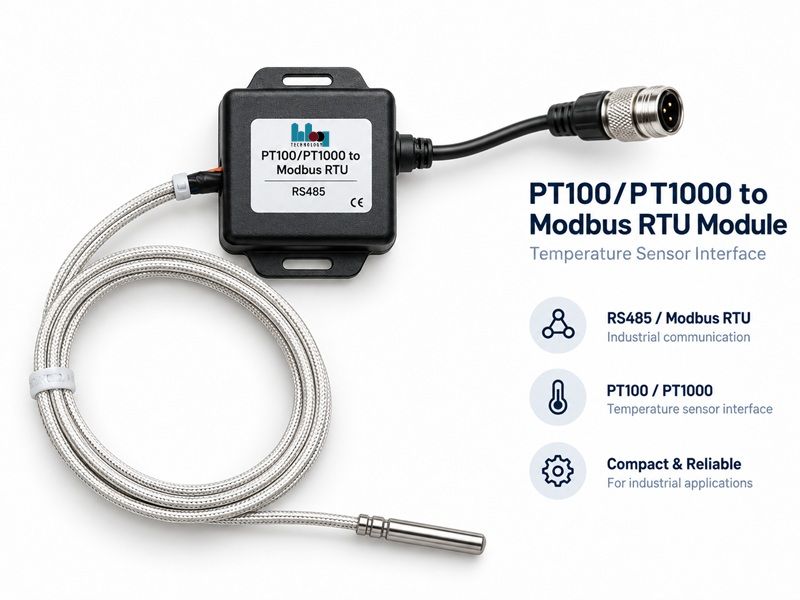
Product overview: isolated RS-485/Modbus RTU communication, PT100/PT1000 sensor input, and a compact industrial enclosure.
Tổng quan sản phẩm: giao tiếp RS-485/Modbus RTU cách ly, ngõ vào cảm biến PT100/PT1000 và vỏ công nghiệp nhỏ gọn.
| ModelModel |
SensorCảm biến |
AccuracyĐộ chính xác |
TechCông nghệ |
| PT100-E |
PT100 |
±0.25 °C |
Analog AFE + DSP FilterAFE analog + lọc DSP |
| PT100-P |
PT100 |
±0.15 °C |
Digital Frontend (15-bit)Frontend số (15-bit) |
| PT1000-P |
PT1000 |
±0.15 °C |
Digital Frontend (15-bit)Frontend số (15-bit) |
Note: Premium (-P) models include automatic hardware-level self-diagnostics for broken wires and short circuits. The Economy (-E) model relies on out-of-range software checks.
Lưu ý: Dòng Premium (-P) có tự chẩn đoán phần cứng (đứt dây, chập mạch). Dòng Economy (-E) dựa vào kiểm tra phần mềm khi giá trị ngoài dải.
Modbus RTU Integration
Tích hợp Modbus RTU
Input Registers (FC 04)Thanh ghi Input (FC 04)
| AddrĐịa chỉ |
SymbolKý hiệu |
TypeKiểu |
ScaleTỷ lệ |
DescriptionMô tả |
| 0x0000 |
Temp |
INT16 |
×0.01 |
Final Temp. 0x7FFF = ErrorNhiệt độ cuối. 0x7FFF = Lỗi |
| 0x0001 |
Res_H |
UINT16 |
1 mΩ |
Resistance MSW (32-bit total)Điện trở MSW (tổng 32-bit) |
| 0x0002 |
Res_L |
UINT16 |
1 mΩ |
Resistance LSWĐiện trở LSW |
| 0x0003 |
Status |
UINT16 |
Bits |
Fault flags (Open/Short/etc.)Cờ lỗi (hở/chập…) |
| 0x0005 |
HW_Opt |
UINT16 |
- |
1=Premium, 2=Economy1=Premium, 2=Economy |
Holding Registers (FC 03/06/16)Thanh ghi Holding (FC 03/06/16)
| AddrĐịa chỉ |
SymbolKý hiệu |
RangeDải |
DescriptionMô tả |
| 0x1000 |
Slave ID |
1-247 |
Modbus Device IDID thiết bị Modbus |
| 0x1001 |
Baud |
0-3 |
0:9600, 1:19200, 2:38400, 3:115.2k |
| 0x1003 |
Wires |
0-1 |
0: 2-wire, 1: 3-wire RTD0: RTD 2 dây, 1: RTD 3 dây |
| 0x1006 |
Offset |
±1000 |
Field trim (±10.00 °C max)Chỉnh offset hiện trường (tối đa ±10.00 °C) |
Industrial Security & Workflow
Bảo mật & quy trình cấu hình
To prevent accidental misconfiguration in noisy RS-485 environments, the module
enforces a strict configuration workflow using "Magic Words".
Để ngăn chặn việc thay đổi cấu hình ngoài ý muốn trong môi trường RS-485 nhiễu,
module áp dụng quy trình cấu hình nghiêm ngặt sử dụng "Magic Words".
Configuration Steps
Các bước cấu hình
1. Unlock: Write 0x5A5A to Sys Control (0x1007). Opens a 60s config window.
2. Modify: Update ID, Baudrate, or User Offset registers.
3. Save: Write 0x00FF to Apply Config (0x100F) to commit to Flash and lock the device.
4. Factory Reset: Write 0xDEAD to Sys Control to revert to default settings (ID 1, 9600).
1. Mở khóa: Ghi 0x5A5A vào Sys Control (0x1007). Mở cửa sổ cấu hình 60 giây.
2. Chỉnh sửa: Cập nhật ID, Baudrate hoặc thanh ghi User Offset.
3. Lưu: Ghi 0x00FF vào Apply Config (0x100F) để ghi Flash và khóa thiết bị.
4. Factory Reset: Ghi 0xDEAD vào Sys Control để về mặc định (ID 1, 9600).
The device enforces a hard limit of ±10.00 °C on the User Offset. Out-of-bounds writes will result in a Modbus Exception.
Thiết bị giới hạn cứng User Offset ở ±10.00 °C. Ghi ngoài dải sẽ trả về Modbus Exception.
Diagnostics & LEDs
Chẩn đoán & LED
LED Patterns
Mẫu LED
| PatternMẫu |
MeaningÝ nghĩa |
| Heartbeat (1 Hz) |
Normal operationVận hành bình thường |
| Rapid (10 Hz) |
Booting / InitializingKhởi động / khởi tạo |
| Fast Flicker |
Modbus Traffic (TX/RX)Lưu lượng Modbus (TX/RX) |
| Fast Blink (5 Hz) |
Sensor Fault (Open/Short)Lỗi cảm biến (hở/chập) |
| Double Blink |
Config Error (NVM corrupted)Lỗi cấu hình (NVM hỏng) |
Status Register (0x0003)
Thanh ghi trạng thái (0x0003)
• Bit 0-1: RTD Resistance High/Low (Out of range).
• Bit 2-5: Hardware electrical fault detected.
• Bit 8: Configuration error (Device needs Factory Reset).
• Bit 15: Offset applied (Field trim active).
• Bit 0-1: Điện trở RTD cao/thấp (ngoài dải).
• Bit 2-5: Phát hiện lỗi điện phần cứng.
• Bit 8: Lỗi cấu hình (cần Factory Reset).
• Bit 15: Đã áp dụng offset (chỉnh hiện trường).
Wiring & Pinout
Đấu nối & sơ đồ chân
Terminal Pinout
Sơ đồ đầu cuối
| LabelNhãn |
DescriptionMô tả |
| VIN |
7–36 V_DC Positive supplyNguồn dương 7–36 V_DC |
| GND |
Power Ground (0 V)Mass nguồn (0 V) |
| A+ / B- |
RS-485 Data+ / Data-RS-485 Data+ / Data- |
| RTD+ |
Sensor Excitation (Positive wire)Kích thích cảm biến (dây dương) |
| RTD- |
Sensor Return (Negative wire)Hồi cảm biến (dây âm) |
| RTD_S |
Sense Wire (3rd wire for lead compensation)Dây sense (dây thứ 3 bù trở dây dẫn) |
3-Wire Connection
Đấu nối 3 dây
For 3-wire RTDs, connect the sense wire to RTD_S. This enables automatic lead resistance compensation, which is essential for high accuracy over long cable runs. For 2-wire RTDs, leave RTD_S open or jumper it to RTD-.
Với RTD 3 dây, nối dây sense vào RTD_S để tự bù trở dây dẫn — cần thiết khi cáp dài để đạt độ chính xác cao. Với RTD 2 dây, để RTD_S hở hoặc nối tắt với RTD-.
HBQ PT100 Modbus Master
HBQ PT100 Modbus Master
Desktop configuration software v1.4.0 — monitor, configure, and calibrate the 1CH-PT100-Modbus module over RS485 (Modbus RTU).
Phần mềm cấu hình desktop v1.4.0 — giám sát, cấu hình và hiệu chuẩn module 1CH-PT100-Modbus qua RS485 (Modbus RTU).
Download (Portable · Windows x64)
Tải về (Portable · Windows x64)
File: HBQ PT100 Modbus Master-1.4.0-Portable.exe (~87 MB) — no Node.js or installation required.
File: HBQ PT100 Modbus Master-1.4.0-Portable.exe (~87 MB) — không cần cài Node.js hay cài đặt.
Download from Google Drive →
Tải từ Google Drive →
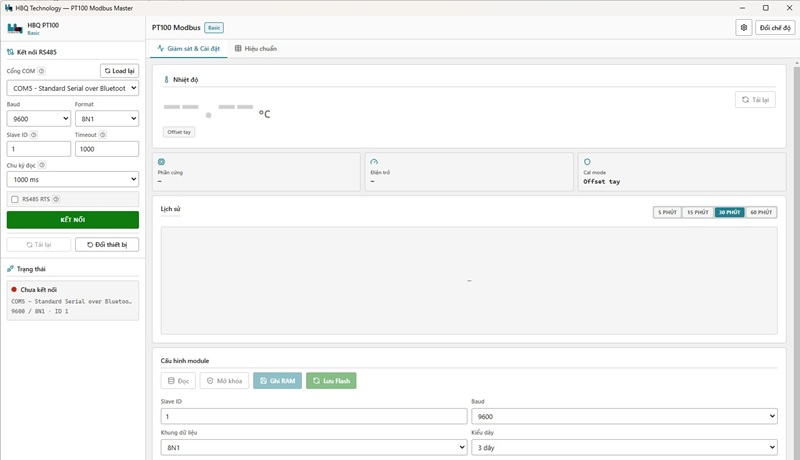
HBQ PT100 Modbus Master — desktop tool for monitoring, configuration, and calibration.
HBQ PT100 Modbus Master — tool desktop giám sát, cấu hình và hiệu chuẩn module PT100.
Overview
Giới thiệu
HBQ PT100 Modbus Master is HBQ Technology's desktop tool for field technicians (Basic mode) and factory (Advance mode). It provides real-time temperature monitoring, module configuration, multi-point calibration, and register inspection.
HBQ PT100 Modbus Master là tool desktop của HBQ Technology cho kỹ thuật viên(chế độ Basic) và Nhà máy (Advance). Hỗ trợ giám sát nhiệt độ realtime, cấu hình module, hiệu chuẩn đa điểm và kiểm tra thanh ghi.
| FeatureChức năng |
DescriptionMô tả |
| RS485 connectionKết nối RS485 |
COM port scan, baud/parity, Slave ID, RTS support for CH340 adaptersQuét cổng COM, baud/parity, Slave ID, hỗ trợ RTS cho adapter CH340 |
| Real-time monitorGiám sát realtime |
°C display, history chart 5–60 min, sensor fault alertsHiển thị °C, biểu đồ lịch sử 5–60 phút, cảnh báo lỗi cảm biến |
| Module configCấu hình module |
Read → Unlock → Write RAM → Save Flash (Apply)Đọc → Mở khóa → Ghi RAM → Lưu Flash (Apply) |
| PT100 calibrationHiệu chuẩn PT100 |
Manual offset, Cal 3-point or Cal 6-point (REF + RAW)Offset tay, Cal 3 điểm hoặc Cal 6 điểm (REF + RAW) |
| Advance registersAdvance — thanh ghi |
Input FC04, Holding FC03, system log terminalInput FC04, Holding FC03, nhật ký hệ thống dạng terminal |
Installation & Launch
Cài đặt & mở app
Portable build — extract or save the .exe anywhere and double-click to run. No installer, no Node.js.
Bản Portable — lưu file .exe ở bất kỳ đâu và double-click để chạy. Không cần cài đặt, không cần Node.js.
| StepBước |
ActionThao tác |
| 1 |
Download HBQ PT100 Modbus Master-1.4.0-Portable.exe from Google Drive
Tải HBQ PT100 Modbus Master-1.4.0-Portable.exe từ Google Drive
|
| 2 |
If Windows SmartScreen appears → More info → Run anyway (app is not code-signed yet)
Nếu Windows SmartScreen cảnh báo → More info → Run anyway (app chưa ký Authenticode)
|
| 3 |
Double-click the .exe — the app opens directly
Double-click file .exe — app mở ngay
|
Requirements: Windows 10/11 x64 · USB-RS485 adapter (CH340, etc.) · driver installed for the adapter.
Yêu cầu: Windows 10/11 x64 · adapter USB-RS485 (CH340…) · đã cài driver cho adapter.
Choose Mode
Chọn chế độ
| ModeChế độ |
UserĐối tượng |
DescriptionMô tả |
| Basic |
On-siteHiện trường |
Monitor, configure, calibrateGiám sát, cấu hình, hiệu chuẩn |
| Advance |
FactoryNhà máy |
Registers, system log, detailed configThanh ghi, nhật ký, cấu hình chi tiết |
Advance login: username admin · password stm32f103rd
Đăng nhập Advance: tài khoản admin · mật khẩu stm32f103rd
RS485 Connection
Kết nối RS485
Set up Modbus RTU link between PC and PT100 module via USB-RS485 before monitoring or writing config.
Thiết lập liên kết Modbus RTU giữa máy tính và module PT100 qua USB-RS485 trước khi giám sát hay ghi cấu hình.
1. Plug in USB-RS485 (CH340…) — do not use FTDI debug UART.
2. Click Reload → select COM port.
3. Default module: 9600 / 8N1 / Slave 1.
4. If CH340 has TX/RX direction issues → enable RS485 RTS (icon ?).
5. Click CONNECT (green) · DISCONNECT (red) when connected.
1. Cắm USB-RS485 (CH340…) — không dùng cổng debug FTDI.
2. Load lại → chọn Cổng COM.
3. Mặc định module: 9600 / 8N1 / Slave 1.
4. Adapter CH340 lỗi chiều TX/RX → bật RS485 RTS (icon ?).
5. Bấm KẾT NỐI (xanh) · NGẮT KẾT NỐI (đỏ) khi đã nối.
Status dot: green = OK · yellow = processing · red = error / not connected.
Chấm trạng thái: xanh = OK · vàng = đang xử lý · đỏ = lỗi / chưa kết nối.
Basic — Monitor & Configure
Basic — Giám sát & Cài đặt
Monitor: large °C display, history chart (5 / 15 / 30 / 60 min), sensor fault alerts.
Configure: Read → Unlock (60 s) → adjust parameters → Write RAM → Save Flash (Apply permanently).
Giám sát: nhiệt độ lớn ở trung tâm, biểu đồ lịch sử 5 / 15 / 30 / 60 phút, cảnh báo lỗi cảm biến.
Cấu hình: Đọc → Mở khóa (60 giây) → chỉnh thông số → Ghi RAM → Lưu Flash (Apply vĩnh viễn).
Calibration
Hiệu chuẩn
1. Unlock → choose Cal 3 or Cal 6-point
2. Write cal mode
3. Enter REF + RAW (or click Get RAW)
4. Write table → Write + Apply
1. Mở khóa → chọn Cal 3 hoặc Cal 6 điểm
2. Ghi chế độ cal
3. Nhập REF + RAW (hoặc Lấy RAW)
4. Ghi bảng → Ghi + Apply
T_display = T_CVD + Offset → offset stored at 0x1006
T_display = T_CVD + Offset → offset lưu tại 0x1006
Advance — Extra Tabs
Advance — Tab bổ sung
| TabTab |
FunctionChức năng |
| MonitorGiám sát |
Chart, fault codes, system log (terminal)Biểu đồ, mã lỗi, nhật ký hệ thống (terminal) |
| ConfigCấu hình |
Read → Unlock → Write registers → ApplyĐọc → Mở khóa → Ghi thanh ghi → Apply |
| RegistersThanh ghi |
Input FC04 + Holding FC03Input FC04 + Holding FC03 |
App Settings ⚙
Cài đặt app ⚙
Top-right gear icon: language VI / EN · Light / Dark theme · app version info. Does not affect module Flash config.
Icon ⚙ góc phải: ngôn ngữ VI / EN · giao diện Sáng / Tối · phiên bản app. Không ảnh hưởng cấu hình Flash trên module.
Troubleshooting
Xử lý sự cố
| IssueVấn đề |
SuggestionGợi ý |
| COM port not foundKhông thấy COM |
Re-plug USB-RS485, install CH340 driver, click ReloadCắm lại USB-RS485, cài driver CH340, bấm Load lại |
| Connection failedKết nối thất bại |
Swap A/B wires, common GND, try RTSĐảo A/B, GND chung, thử RTS |
| Wrong baud / slaveSai baud / slave |
App auto-fills from module — reconnectApp tự điền từ module — kết nối lại |
| SmartScreen blockedSmartScreen chặn |
More info → Run anywayMore info → Chạy dù vậy (Run anyway) |