 INS / IMU Navigation Module / Technical Wiki
Rugged INS / IMU navigation module for DroneCAN vehicles.Module định hướng INS / IMU công nghiệp cho phương tiện DroneCAN.
A sealed navigation module with dual-layer sensing, GNSS-aided inertial data and two independent CAN buses. This wiki covers installation, firmware bring-up, CAN selection and the DroneCAN messages used for integration. Module định hướng dạng kín với cảm biến hai tầng, dữ liệu quán tính hỗ trợ GNSS và hai bus CAN độc lập. Wiki này hướng dẫn lắp đặt, nạp firmware, chọn bus CAN và các message DroneCAN dùng khi tích hợp.
IMU, Gyro and GNSS SpecificationsThông số IMU, Gyro và GNSS
Configured startup ranges from the V6X000 / HBQ_IMU_A firmware profile and INS-CAN carrier design.Dải cấu hình khởi động theo profile firmware V6X000 / HBQ_IMU_A và thiết kế baseboard INS-CAN.
AccelerometerGia tốc kế
| Device | Full-scale | ODR / notes |
|---|---|---|
| ICM-42688-P | ±16 g | ODR 8 kHz; FIFO |
| BMI088 | ±24 g | 1600 Hz; FIFO |
| ICM-45686 | ±32 g | ODR 6.4 kHz; FIFO |
| IIS3DWBTR | ±16 g | ODR 26.7 kHz; 0.488 mg/LSB; all axes |
GyroscopeCon quay hồi chuyển
| Device | Full-scale | ODR / notes |
|---|---|---|
| ICM-42688-P | ±2000 °/s | ODR 8 kHz; FIFO |
| BMI088 | ±2000 °/s | 2000 Hz; bandwidth 532 Hz; FIFO |
| ICM-45686 | ±4000 °/s | ODR 6.4 kHz; FIFO |
GNSS / GPSGNSS / GPS
| ItemHạng mục | SpecificationThông số |
|---|---|
| Receiver moduleModule thu | u-blox MAX-M10N (onboard carrier) |
| FunctionChức năng | Concurrent multi-GNSS positioning aidHỗ trợ định vị multi-GNSS đồng thời |
| DroneCAN outputs | Fix / Fix2 / Auxiliary |
| Default publish rateTần số phát mặc định | 5 Hz via DRCANFD_RATE_GNSS (0–20 Hz) |
| Estimator couplingGhép với estimator | GNSS-aided EKF2 attitude / position when fix is validEKF2 hỗ trợ GNSS khi fix hợp lệ |
Sensor fusionSensor fusion
Primary estimator EKF2. States include attitude, local/global position and odometry. Magnetometer path publishes MagneticFieldStrength at default 50 Hz.Estimator chính EKF2. Trạng thái gồm attitude, vị trí local/global và odometry. Đường magnetometer phát MagneticFieldStrength mặc định 50 Hz.
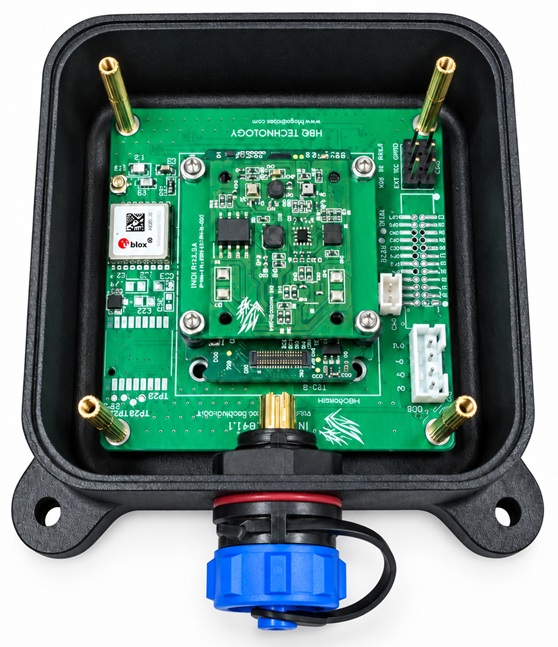
Modular stackKiến trúc mô-đun
IMU daughterboard mounts above the carrier on standoffs for serviceability and mechanical isolation. Range/ODR values are firmware startup configuration, not navigation-accuracy claims.Bo IMU lắp phía trên baseboard qua trụ để bảo trì và cách ly cơ khí. Giá trị range/ODR là cấu hình khởi động firmware, không phải claim độ chính xác định hướng.
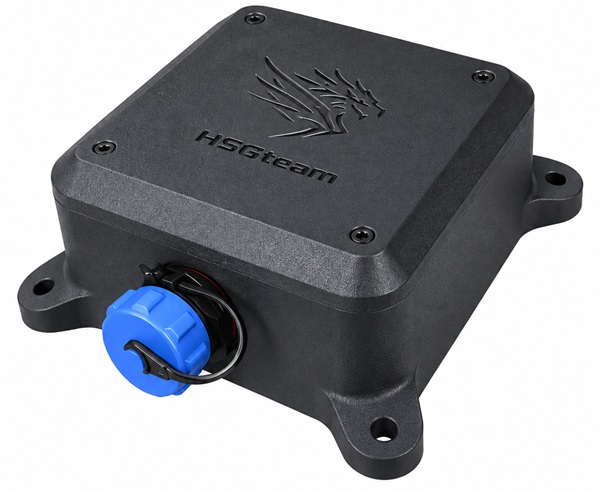
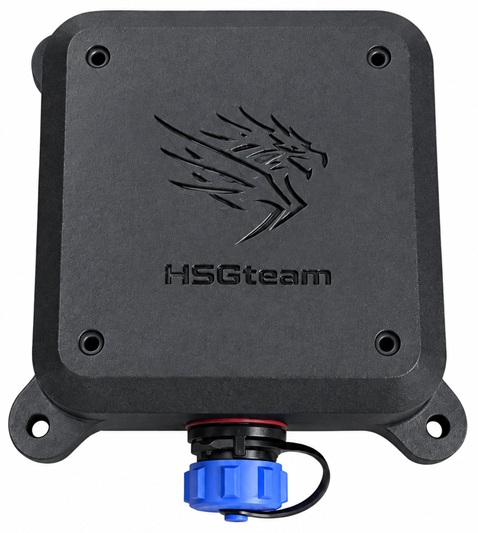
Hardware ViewsHình ảnh sản phẩm
Product photos for mechanical recognition and mounting orientation.Ảnh sản phẩm để nhận biết cơ khí và hướng lắp.
Connector InterfaceGiao diện connector
External interface is an SP13 female circular connector. Pin 1 is marked on the connector face.Giao diện ngoài là connector tròn SP13 female. Chân 1 được đánh dấu trên mặt connector.
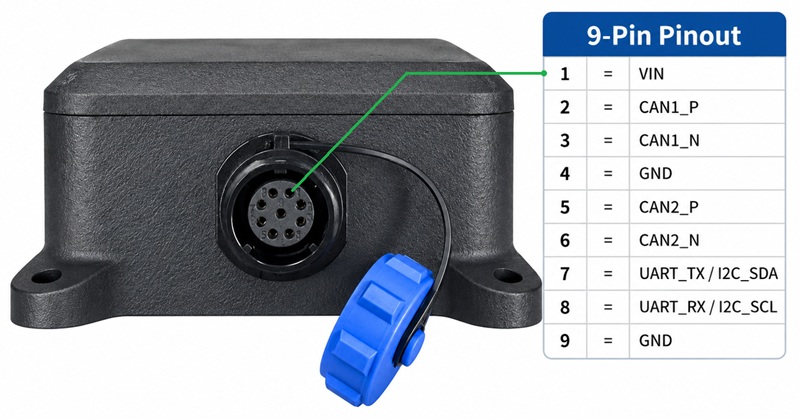
| Pin | Signal | DescriptionMô tả |
|---|---|---|
| 1 | VIN | Power inputNguồn vào |
| 2 | CAN1_P | CAN1 High / Positive |
| 3 | CAN1_N | CAN1 Low / Negative |
| 4 | GND | Ground |
| 5 | CAN2_P | CAN2 High / Positive |
| 6 | CAN2_N | CAN2 Low / Negative |
| 7 | UART_TX / I2C_SDA | UART TX or I2C SDA |
| 8 | UART_RX / I2C_SCL | UART RX or I2C SCL |
| 9 | GND | Ground |
Installation & Bring-upLắp đặt & đưa vào hệ thống
Follow this sequence so later CAN checks remain meaningful and traceable.Thực hiện tuần tự để việc kiểm tra bus sau đó có ý nghĩa và có thể truy vết.
MountCố định cơ khí
Use the four mounting ears. Keep orientation consistent with the firmware / calibration setup.Dùng bốn tai gá. Giữ hướng lắp nhất quán với cấu hình firmware / calibration.
Wire SP13Đấu SP13
Connect VIN, GND and the selected CAN pair using the released pinout. Do not rewire while powered.Đấu VIN, GND và cặp CAN đã chọn theo pinout đã phát hành. Không đổi dây khi đang cấp nguồn.
FirmwareNạp firmware
Flash the px4_fmu-v6x-hbq build, then reboot fully.Nạp build px4_fmu-v6x-hbq, sau đó reboot hoàn chỉnh.
Bus & IDChọn bus & ID
Select CAN1 or CAN2 for the host adapter; change Node ID if there is a conflict.Chọn CAN1 hoặc CAN2 theo adapter host; đổi Node ID nếu có xung đột.
ValidateXác nhận
Confirm firmware status and expected message rates before application use.Kiểm tra status firmware và tần số message trước khi đưa vào ứng dụng.
Power & groundNguồn & mass
Pin 1 = VIN, pins 4 and 9 = GND. Keep return paths short and common with the host.Chân 1 = VIN, chân 4 và 9 = GND. Giữ đường mass ngắn và chung với host.
Adapter typeLoại adapter
CAN1 needs a CAN FD adapter. CAN2 uses classic CAN only.CAN1 cần adapter CAN FD. CAN2 chỉ dùng classic CAN.
Unique Node IDNode ID duy nhất
Each node on the same physical bus needs a distinct ID. The two buses are independent.Mỗi node trên cùng bus vật lý cần ID riêng. Hai bus độc lập với nhau.
Firmware & BootFirmware & Boot
Board target and verification commands for the released HBQ profile.Target board và lệnh xác nhận cho profile HBQ đã phát hành.
Build targetTarget build
Use target px4_fmu-v6x-hbq_default. Output image:Dùng target px4_fmu-v6x-hbq_default. File kết quả:
build/px4_fmu-v6x-hbq_default/px4_fmu-v6x-hbq_default.px4
make px4_fmu-v6x-hbq_default -j$(nproc)Verify after rebootXác nhận sau reboot
After flashing via QGroundControl and rebooting, check enable flags then the service for the bus in use.Sau khi nạp qua QGroundControl và reboot, kiểm tra enable flag rồi service tương ứng bus đang dùng.
param show DRCANFD_ENABLE
param show UAVCAN_ENABLE
dronecan_fd status
uavcan statusDRCANFD_ENABLE=1, UAVCAN_ENABLE=1.Two Independent CAN BusesHai bus CAN độc lập
Select one bus for the host. Do not copy CAN1 FD settings onto CAN2.Chọn một bus cho host. Không chuyển setting CAN FD của CAN1 sang CAN2.
dronecan_fdDroneCAN FD1 Mbps nominal2 Mbps data
Node ID: DRCANFD_NODE_ID (default 1, range 1–125). Change requires reboot.Node ID: DRCANFD_NODE_ID (mặc định 1, dải 1–125). Đổi xong cần reboot.
uavcanDroneCAN classicCAN 2.0B1 Mbps · no FD
Node ID: UAVCAN_NODE_ID (default 1, range 1–125). Change requires reboot.Node ID: UAVCAN_NODE_ID (mặc định 1, dải 1–125). Đổi xong cần reboot.
DroneCAN Data Protocol (CAN1)Protocol dữ liệu DroneCAN (CAN1)
Integration contract for the dronecan_fd publisher. Decode with matching DroneCAN DSDL types.Hợp đồng tích hợp cho publisher dronecan_fd. Giải mã bằng đúng kiểu DSDL DroneCAN tương ứng.
| GroupNhóm | DroneCAN type | ContentNội dung | Default |
|---|---|---|---|
| Raw IMU | uavcan.equipment.ahrs.RawIMU | Gyro / accel, integration interval, covarianceGyro / accel, khoảng tích phân, covariance | 100 Hz |
| Attitude | uavcan.equipment.ahrs.Solution | Quaternion, angular velocity, linear accelerationQuaternion, vận tốc góc, gia tốc tuyến tính | 50 Hz |
| Navigation | uavcan.navigation.GlobalNavigationSolution | Lat/lon, height, orientation, body velocityLat/lon, độ cao, orientation, vận tốc thân | 10 Hz |
| Magnetic field | uavcan.equipment.ahrs.MagneticFieldStrength | Magnetometer field vectorsVector từ trường | 50 Hz |
| GNSS | uavcan.equipment.gnss.Fix / Fix2 | Fix state and positioning fields when validTrạng thái fix và trường định vị khi hợp lệ | 5 Hz |
| System | NodeStatus / GetNodeInfo | Node health and identity for bus toolsSức khỏe và nhận diện node cho công cụ bus | service |
CAN1 Publication RatesTần số phát CAN1
Parameters of the dronecan_fd driver. Start from defaults; change one group at a time and confirm with dronecan_fd status.Tham số của driver dronecan_fd. Bắt đầu từ default; chỉ đổi một nhóm rồi xác nhận bằng dronecan_fd status.
| GroupNhóm | Parameter | Default | Range (Hz)Dải (Hz) |
|---|---|---|---|
| Raw IMU | DRCANFD_RATE_IMU | 100 | 0–400 |
| Attitude | DRCANFD_RATE_ATT | 50 | 0–200 |
| Navigation | DRCANFD_RATE_NAV | 10 | 0–50 |
| Magnetic field | DRCANFD_RATE_MAG | 50 | 0–200 |
| GNSS | DRCANFD_RATE_GNSS | 5 | 0–20 |
| Temperature | DRCANFD_RATE_TEMP | 5 | 0–50 |
| Arming state | DRCANFD_RATE_ARM | 5 | 0–50 |
DiagnosticsChẩn đoán
Work from physical layer to firmware to fusion data. Avoid changing bitrate, Node ID and rates at the same time.Đi từ tầng vật lý đến firmware rồi dữ liệu fusion. Không đổi đồng thời bitrate, Node ID và tần số phát.
No node visible on CAN1Không thấy node trên CAN1
Confirm CAN FD host at 1 Mbps nominal / 2 Mbps data, DRCANFD_ENABLE=1, unique Node ID, then dronecan_fd status.Xác nhận host CAN FD 1 Mbps nominal / 2 Mbps data, DRCANFD_ENABLE=1, Node ID không trùng, rồi chạy dronecan_fd status.
No node visible on CAN2Không thấy node trên CAN2
Use classic CAN at 1 Mbps with FD disabled. Check UAVCAN_ENABLE=1, UAVCAN_NODE_ID and uavcan status.Dùng classic CAN 1 Mbps, tắt FD. Kiểm tra UAVCAN_ENABLE=1, UAVCAN_NODE_ID và uavcan status.
Node present but attitude / nav looks wrongCó node nhưng attitude / nav bất thường
Restore DRCANFD_RATE_* defaults, confirm rates in status, then check estimator health before blaming CAN.Đưa DRCANFD_RATE_* về default, xác nhận rate trong status, rồi kiểm tra estimator trước khi quy lỗi cho CAN.
Node ID change did not applyĐổi Node ID chưa có hiệu lực
Save parameters in QGroundControl and perform a full reboot. Both Node ID parameters require reboot.Lưu parameter trong QGroundControl và reboot hoàn toàn. Cả hai tham số Node ID đều yêu cầu reboot.