Modbus RTU Master
One primary slave focus, up to 600 registers and 60 polling regions.
Một slave chính, tối đa 600 thanh ghi và 60 vùng quét.
Industrial edge node for Modbus RTU, environmental sensing and field I/O, with local alert processing and resilient Ethernet, Wi-Fi or 4G cloud connectivity.Node biên công nghiệp cho Modbus RTU, cảm biến môi trường và I/O hiện trường, xử lý cảnh báo tại chỗ, kết nối Cloud linh hoạt qua Ethernet, Wi-Fi hoặc 4G.
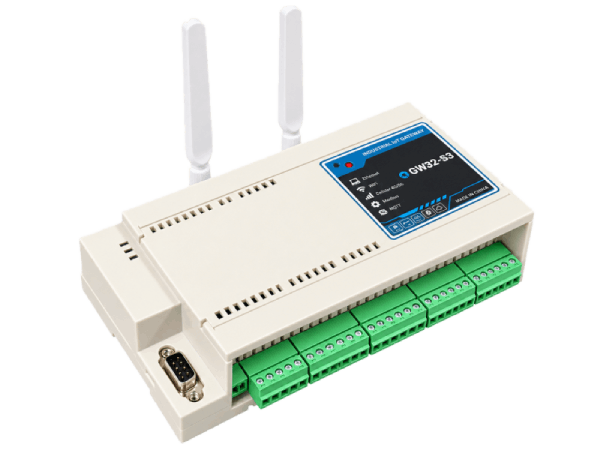
eGW32-S3 brings machine, environmental and digital signals into one edge data pipeline. It polls one primary Modbus RTU slave, reads onboard environmental sensors and field DI, evaluates local rules, and publishes telemetry to a cloud server.
eGW32-S3 hợp nhất dữ liệu máy móc, môi trường và tín hiệu số trong một pipeline tại biên. Thiết bị đọc một Modbus RTU slave chính, cảm biến môi trường onboard và DI hiện trường, xử lý rule tại chỗ rồi gửi telemetry lên Cloud Server.
Ethernet is the preferred uplink. The node can fall back to configured Wi-Fi and then 4G PPP. Local acquisition and alerts continue while the cloud connection is unavailable.
Ethernet là uplink ưu tiên. Thiết bị có thể chuyển sang Wi-Fi đã cấu hình rồi 4G PPP. Thu thập và cảnh báo tại chỗ vẫn tiếp tục khi mất Cloud.
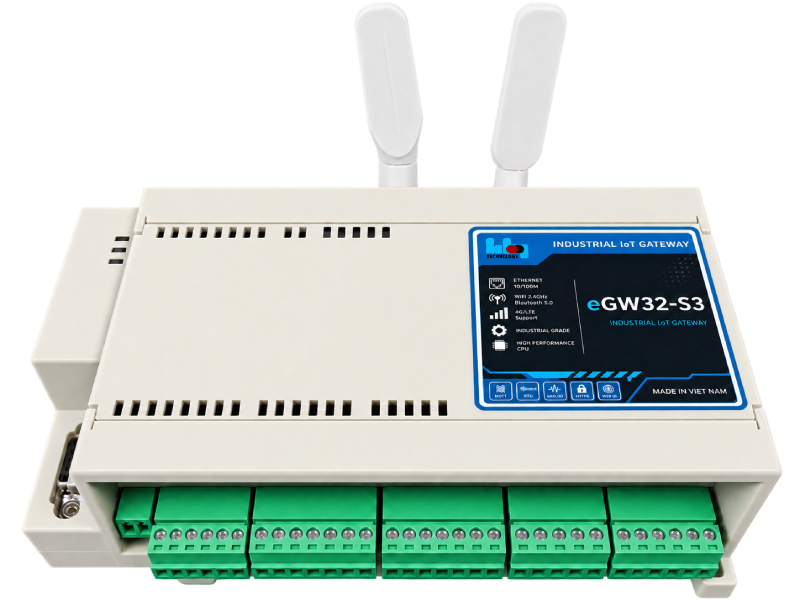
Field acquisition, local action and cloud connectivity in one industrial edge node.
Thu thập hiện trường, xử lý tại chỗ và kết nối Cloud trong một node biên công nghiệp.
One primary slave focus, up to 600 registers and 60 polling regions.
Một slave chính, tối đa 600 thanh ghi và 60 vùng quét.
Six DI, six DO and two relays with feedback.
6 DI, 6 DO và 2 relay có phản hồi tiếp điểm.
T/H · CO₂ · PM1.0 / PM2.5 / PM4.0 / PM10.
Ethernet → Wi-Fi STA → 4G PPP.
Up to 20 local rules with DO/relay or MQTT actions.
Tối đa 20 rule tại chỗ với tác động DO/relay hoặc MQTT.
Optional Zigbee coordinator and LoRa module/firmware configuration.
Tùy chọn Zigbee Coordinator và module/cấu hình LoRa.
SoftAP · Web Control Panel · CSV import.
Dual-bank image, SHA-256 verification and boot-failure rollback.
Dual-bank, xác minh SHA-256 và rollback khi boot lỗi.
Live Web monitoring and optional local display.
Giám sát live qua Web và màn hình tại chỗ (tùy chọn).
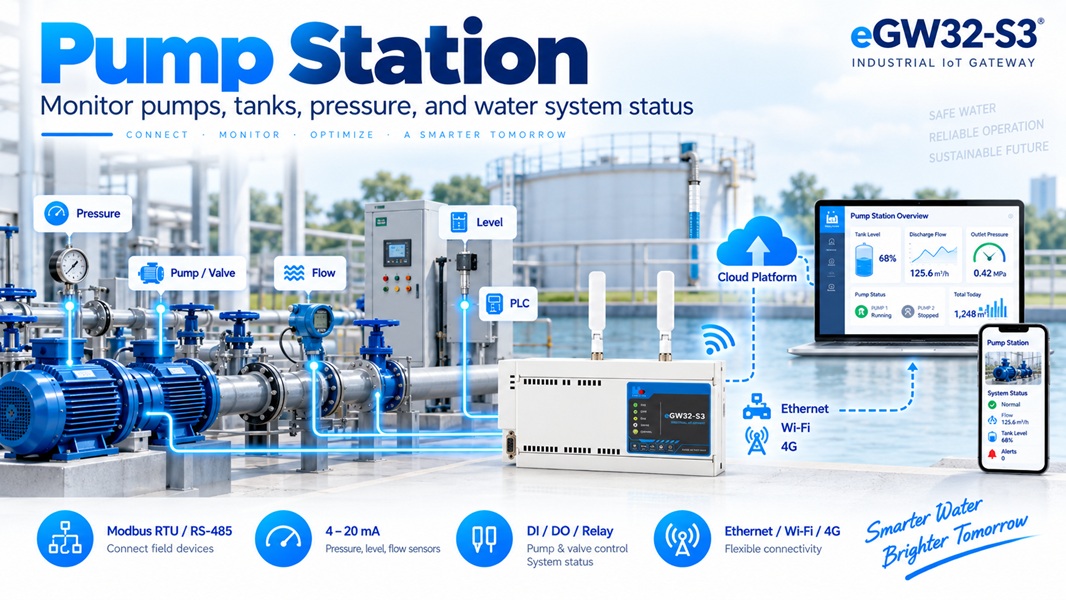
Pressure, level, flow, pump status and Modbus equipment.
Áp suất, mức, lưu lượng, trạng thái bơm và thiết bị Modbus.

VFD, PLC, power meter and machine data for operations.
Dữ liệu biến tần, PLC, đồng hồ điện và máy móc cho vận hành.
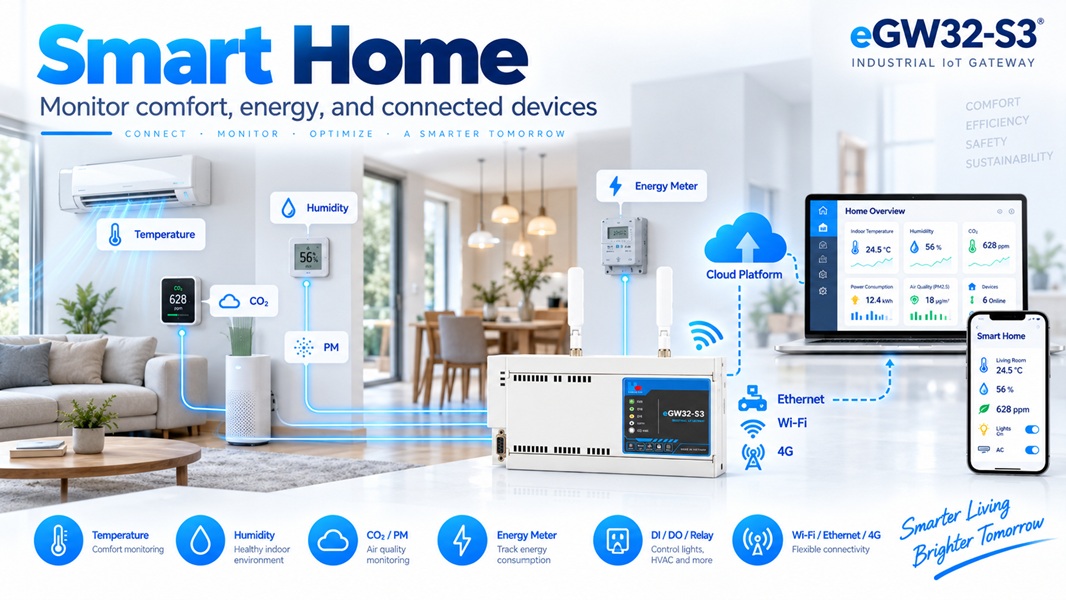
Indoor air quality, energy data and auxiliary I/O control.
Chất lượng không khí, dữ liệu năng lượng và điều khiển I/O phụ trợ.
Field devices connect to eGW32-S3; edge processing organizes values and sends them to HBQconnect or a compatible customer deployment.
Thiết bị hiện trường kết nối tới eGW32-S3; xử lý tại biên tổ chức dữ liệu rồi gửi lên HBQconnect hoặc hệ thống tương thích của khách hàng.
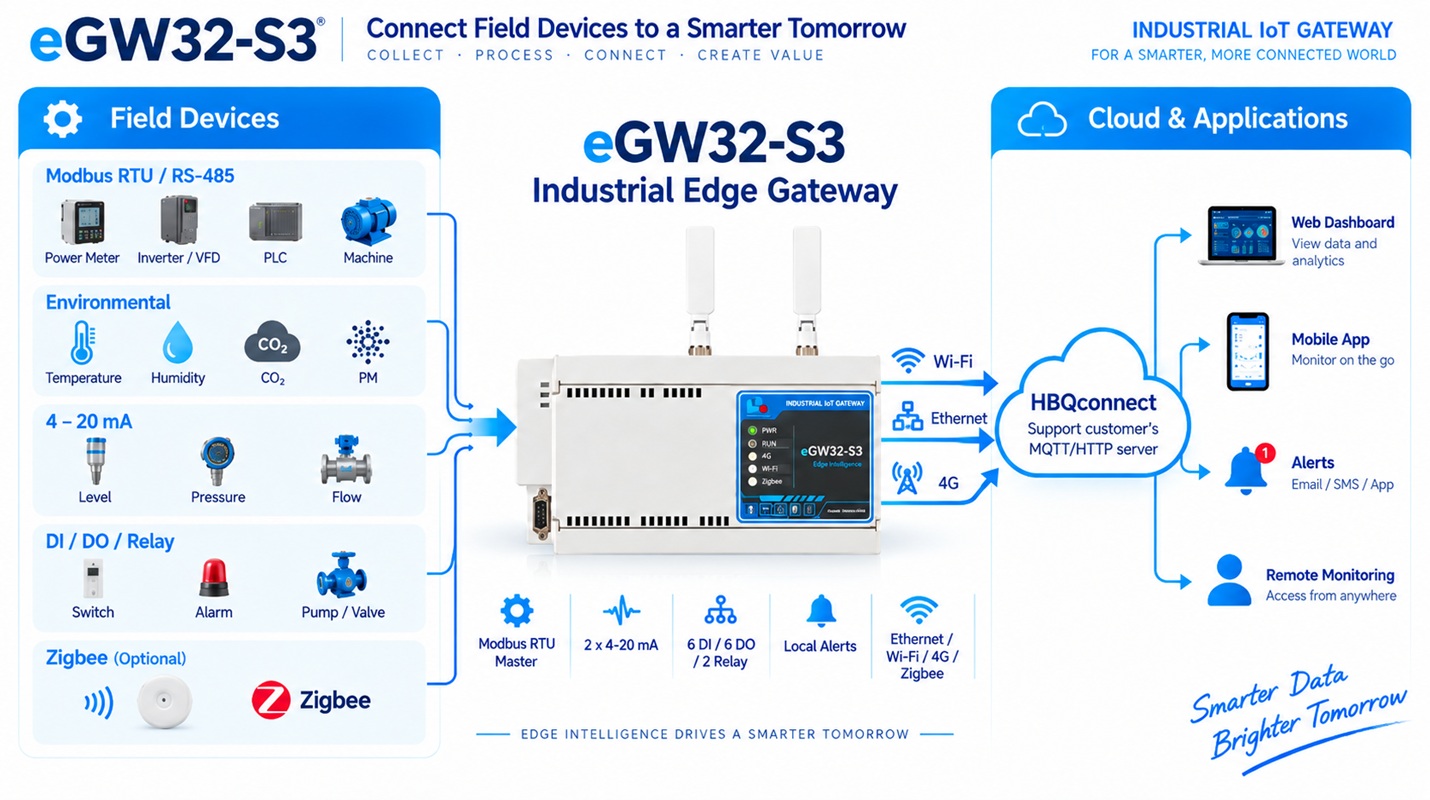
Preliminary public specifications. Check the delivered label and matching release documents before installation.
Thông số công khai preliminary. Kiểm tra nhãn thiết bị và tài liệu release tương ứng trước khi lắp đặt.
Front view, left to right: Power → I2C → DI → DO → Relay → Analog.
Nhìn từ mặt trước, trái sang phải: Nguồn → I2C → DI → DO → Relay → Analog.
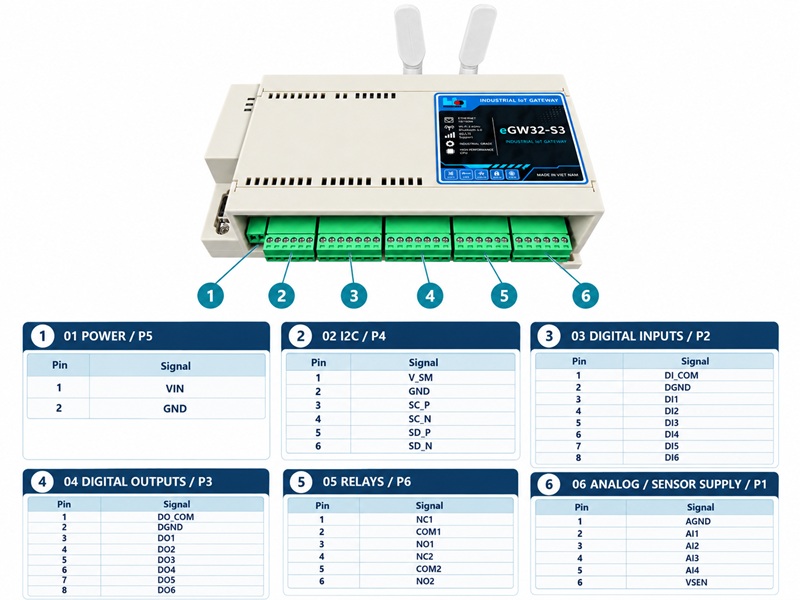
| BlockCụm | Pins from left to rightChân từ trái sang phải |
|---|---|
| 1 · Power / P5 | VIN · GND |
| 2 · I2C / P4 | V_SM · GND · SC_P · SC_N · SD_P · SD_N |
| 3 · DI / P2 | DI_COM · DGND · DI1 · DI2 · DI3 · DI4 · DI5 · DI6 |
| 4 · DO / P3 | DO_COM · DGND · DO1 · DO2 · DO3 · DO4 · DO5 · DO6 |
| 5 · Relay / P6 | NC1 · COM1 · NO1 · NC2 · COM2 · NO2 |
| 6 · Analog / P1 | AGND · AI1 · AI2 · AI3 · AI4 · VSEN |
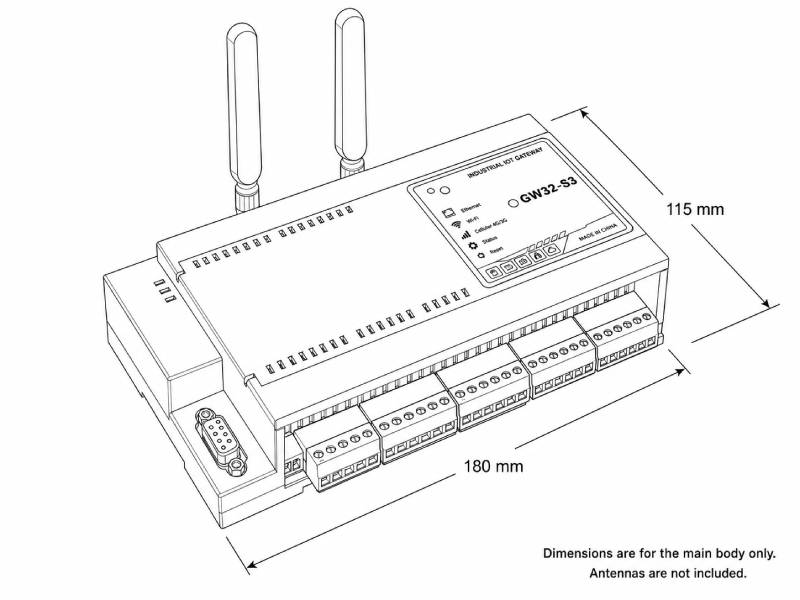
180 × 115 mm, antennas excluded. Production height, tolerances, mounting and weight are not released in this edition.
180 × 115 mm, không gồm anten. Chiều cao, dung sai, kiểu gá và khối lượng sản xuất chưa được phát hành.
The enclosure identifies power, system, cellular, Wi-Fi and Zigbee indicators plus a local numeric display. Use the firmware-matched guide for exact LED codes.
Mặt máy có chỉ báo nguồn, hệ thống, cellular, Wi-Fi và Zigbee cùng màn hình số. Dùng hướng dẫn đúng firmware để tra mã LED.
Three independent network paths connect the node to the configured Cloud Server.
Ba đường mạng độc lập kết nối node tới Cloud Server đã cấu hình.
10/100 Mbps with DHCP. Preferred when link and a valid IP are available.
10/100 Mbps với DHCP. Ưu tiên khi có link và IP hợp lệ.
2.4 GHz site network. SoftAP is used for local commissioning.
Mạng hiện trường 2.4 GHz. SoftAP dùng để cấu hình tại chỗ.
Cellular data when wired LAN and configured Wi-Fi are unavailable.
Dữ liệu cellular khi LAN và Wi-Fi đã cấu hình không khả dụng.
Choose HBQconnect for a ready-to-use IoT service or connect the gateway to a customer-managed server.
Chọn HBQconnect để sử dụng nền tảng IoT sẵn có hoặc kết nối gateway tới máy chủ do khách hàng quản lý.
Connect eGW32-S3 to HBQconnect for centralized device monitoring, telemetry dashboards, alerts and remote operation. The hosted platform is available at https://iot.hbqsolution.com/.
Kết nối eGW32-S3 với HBQconnect để quản lý thiết bị tập trung, hiển thị telemetry, cảnh báo và vận hành từ xa. Nền tảng được cung cấp tại https://iot.hbqsolution.com/.
Connect to a customer-managed MQTT, HTTP or ThingsBoard server. Configure the server address, port, credentials and security parameters in the local Web Control Panel according to the target deployment.
Kết nối tới máy chủ MQTT, HTTP hoặc ThingsBoard của khách hàng. Cấu hình địa chỉ máy chủ, cổng, thông tin xác thực và tham số bảo mật trên Web Control Panel theo hệ thống triển khai.
Monitor values; configure Modbus, network, cloud connections and alerts; import CSV; and start optional Zigbee joining. One concurrent Web/API client is recommended.
Giám sát dữ liệu; cấu hình Modbus, mạng, kết nối Cloud, cảnh báo; import CSV; và mở join Zigbee tùy chọn. Khuyến nghị một Web/API client đồng thời.
Prepare the field map, network and cloud credentials before arriving on site.
Chuẩn bị map hiện trường, mạng và thông tin Cloud trước khi tới site.
Use the delivered label voltage. Join HBQ.eGW32-S3_<SN> and
open 192.168.4.1, or use Ethernet.
Cấp nguồn theo nhãn. Kết nối HBQ.eGW32-S3_<SN> và mở
192.168.4.1, hoặc dùng Ethernet.
Set Wi-Fi and optional 4G parameters. Verify the active path and SNTP.
Cài Wi-Fi và 4G tùy chọn. Kiểm tra đường mạng và SNTP.
Enter broker, port and token. Confirm telemetry in HBQconnect or the customer deployment.
Nhập broker, port và token. Xác nhận dữ liệu trên HBQconnect hoặc hệ thống khách hàng.
Set slave ID and serial format, then add regions or import a reviewed CSV.
Cài Slave ID, định dạng serial, sau đó thêm region hoặc import CSV đã kiểm tra.
Create alerts and safely test DO/relay actions. Join optional Zigbee devices during an authorized permit window.
Tạo cảnh báo và kiểm thử DO/relay an toàn. Join Zigbee tùy chọn trong permit window.
Compare known values, test failover, save CSV/profile and record the final project configuration.
So sánh giá trị chuẩn, thử failover, lưu CSV/profile và ghi cấu hình dự án cuối.